PRD 13 — Marketing
Status: draft · Priority tier: P2 · Size: L · Depends on: PRD 01 (workspace, auth, roles), customers + tags + marketing consent (customers PRD), pricing plans/packages (for referral rewards), PRD 15 (email provider/sender, sent history)
1. Summary
Let a studio owner email its customers: one-off campaigns (wizard, audience by all/tags, block-based content, scheduling, status and engagement stats), recurring lifecycle automations from 22 templates, a referral program with referee/referrer rewards, and smart tags that segment customers automatically. Goal: repeat bookings and win-backs without a third-party tool.
2. Problem & goals
- Owners need to reach opted-in customers and trigger timely messages (welcome, expiring plan, win-back) with minimal setup.
- Goals: draft-to-scheduled campaign in <=6 steps; every send respects marketing consent and monthly quota; owner can see sent/engaged/rate per campaign; automations run unattended.
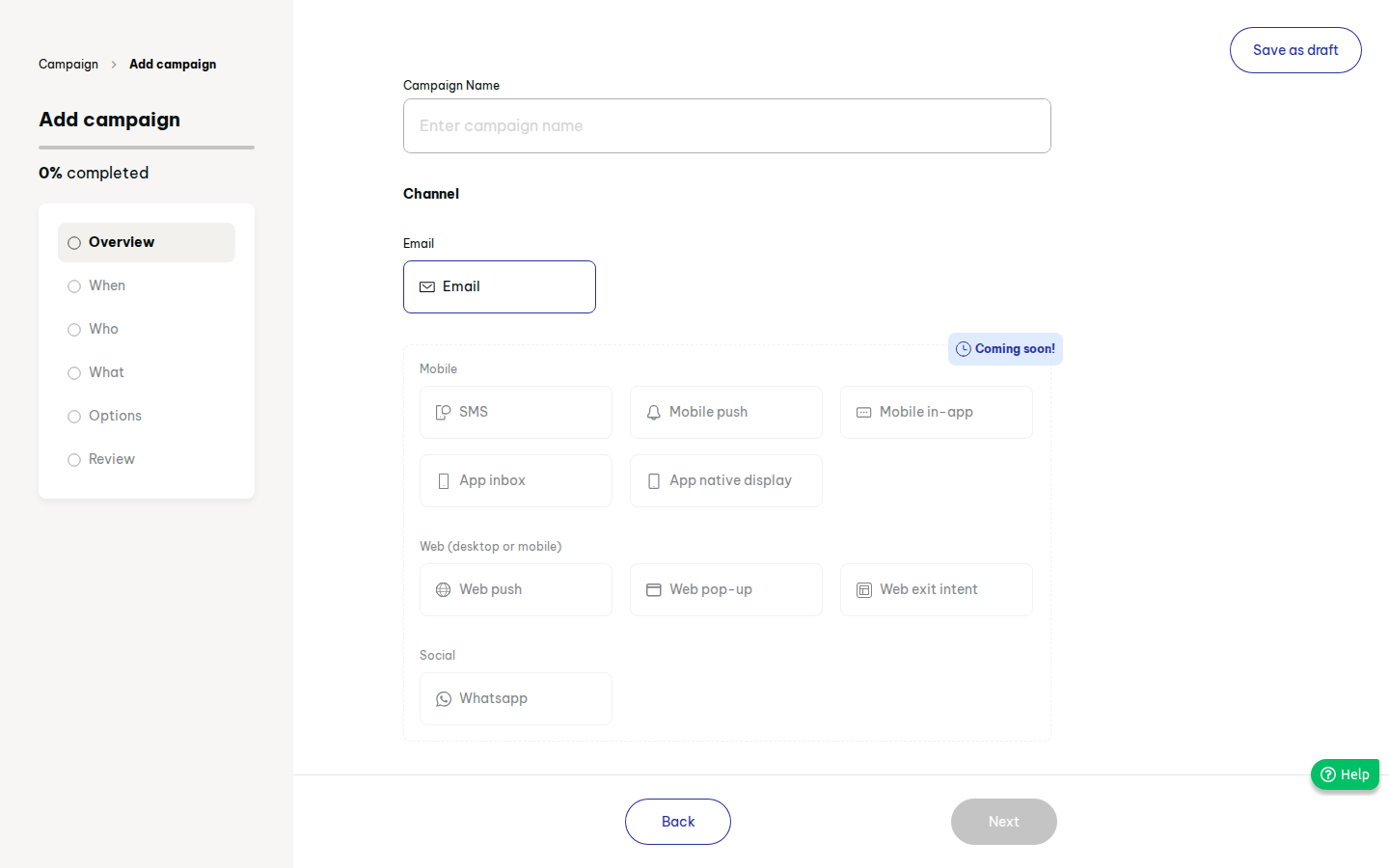
- Non-goals (v1): SMS, WhatsApp, push, in-app, web pop-ups (original shows these as "coming soon"; Out), A/B tests, own SMTP.
3. Users & roles
Owner/admin (full), manager (create/send, no billing), staff (no access), customer (receives; unsubscribes; referee/referrer in storefront).
4. Scope
In (v1)
- Campaign wizard, email channel only (must)
- Audience: all opted-in customers or selected tags (must)
- Block email builder: text, image, button, divider, spacer, columns; styles; merge vars (should; text+button+image is the must core)
- Send now / schedule later; draft / scheduled / completed / archived statuses; stats (must)
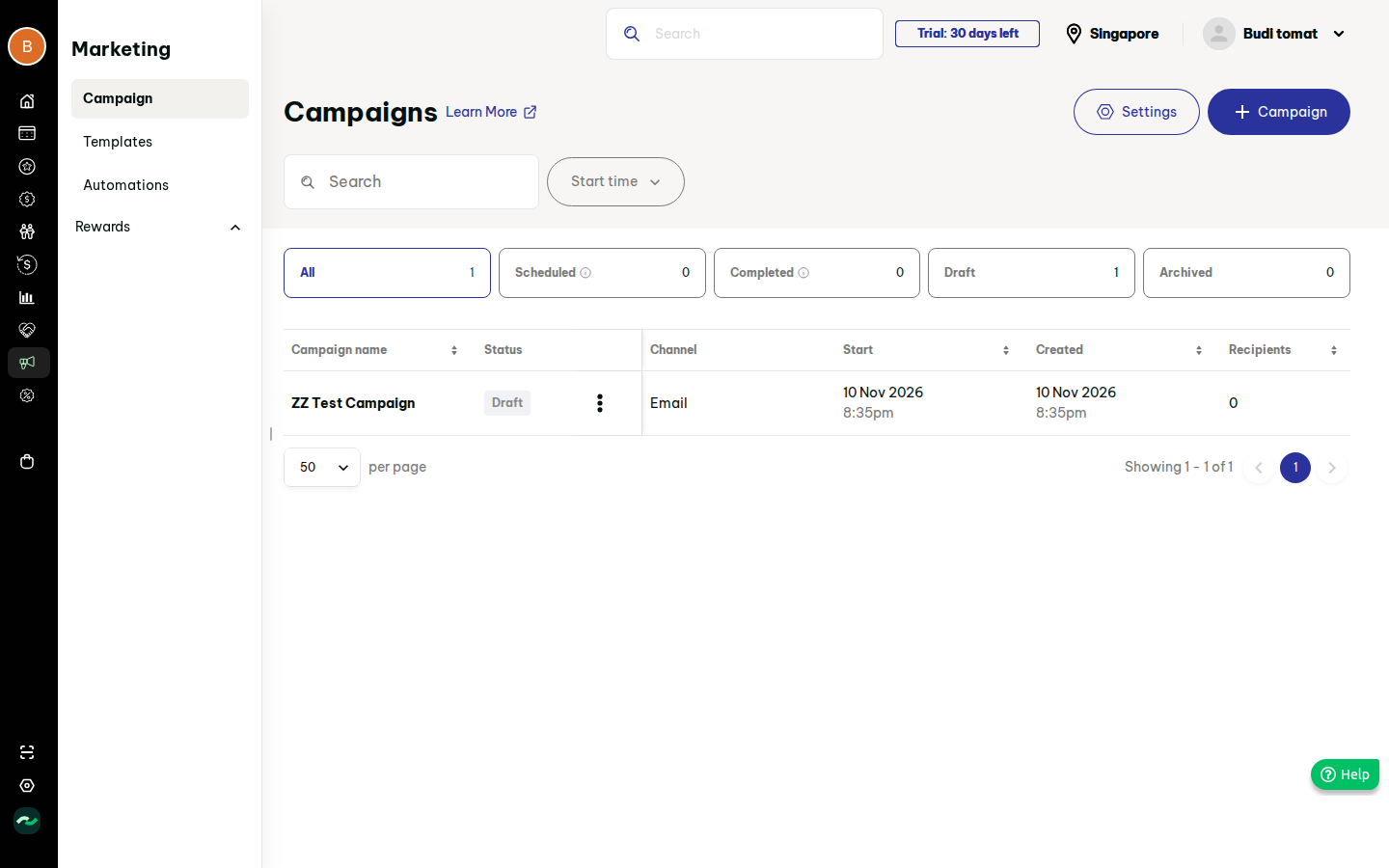
- Campaign list: search, date filter, status tabs, duplicate, delete (must)
- Campaign tags (could)
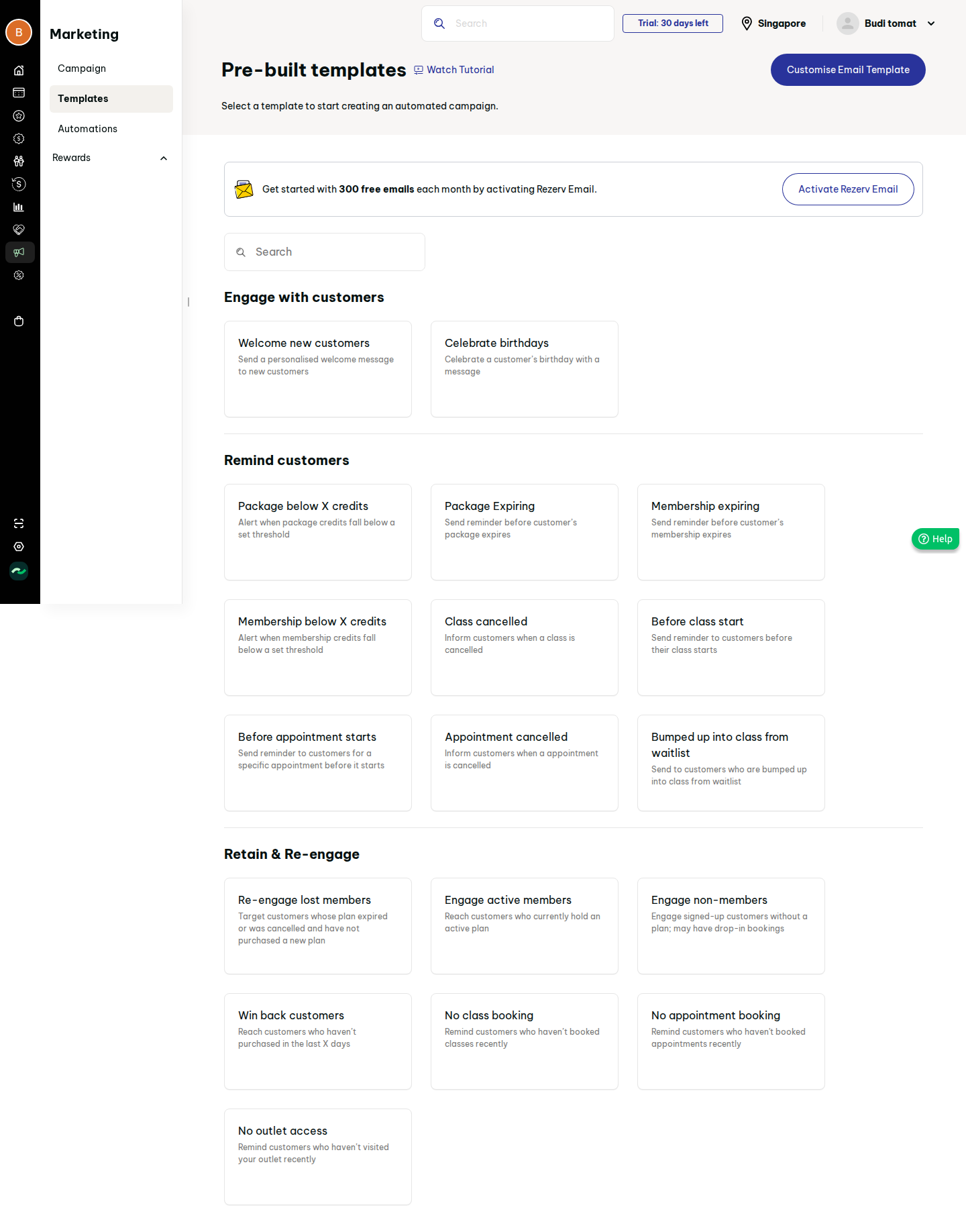
- Automation templates gallery (22) + automations with per-tier limit (should)
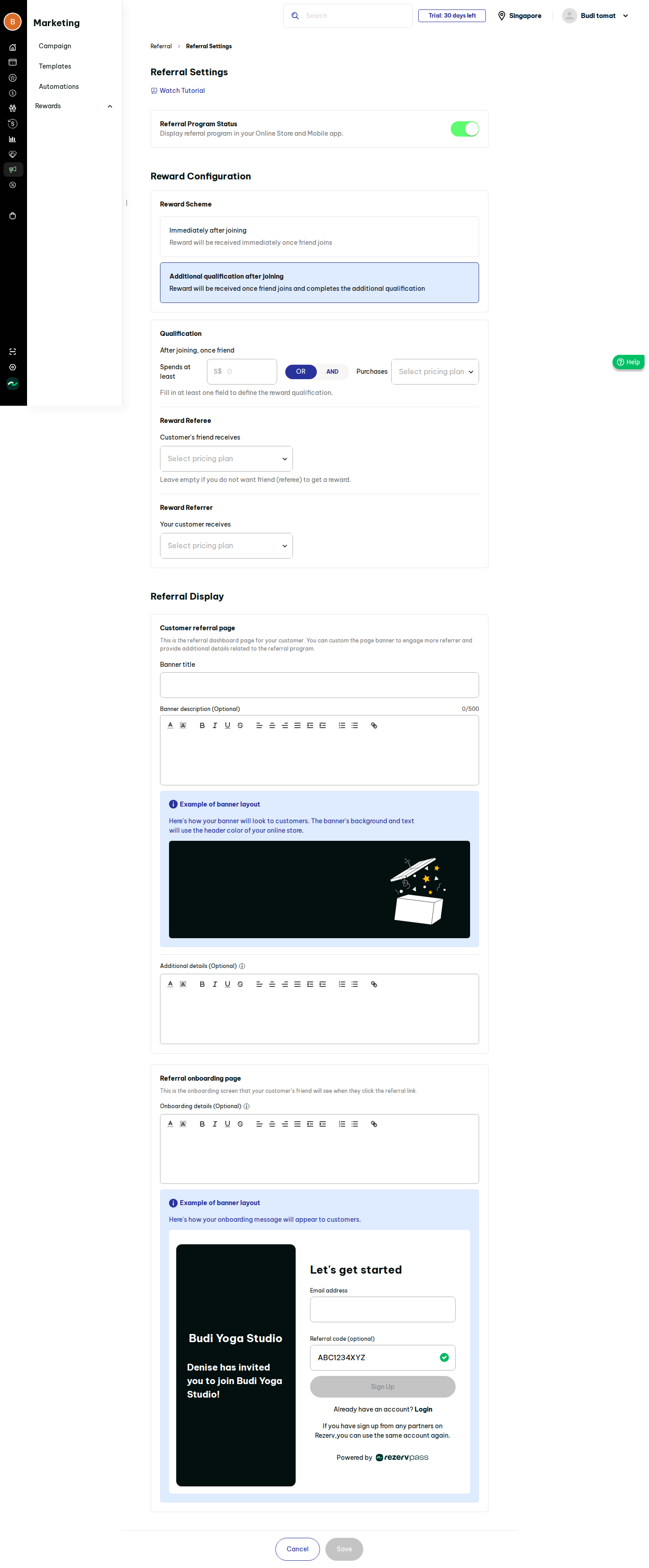
- Referral program settings and tracking (could)
- Smart tags (could, see open questions) Later: SMS/WhatsApp (needs provider), A/B, link-click heatmaps. Out: Rezerv-style "powered by" footer branding; reselling email quota as add-on is a billing decision (pricing tier: TBD).
5. User stories
- US-13-01 As an owner, I want to create a campaign with a name so that I can start composing.
- US-13-02 As an owner, I want to target all subscribers or specific tags so that messages are relevant.
- US-13-03 As an owner, I want to compose with blocks and preview desktop/mobile so that email looks right.
- US-13-04 As an owner, I want to send now or schedule so that timing is controlled.
- US-13-05 As an owner, I want to save drafts at any step so that I never lose work.
- US-13-06 As an owner, I want to see sent/engaged stats so that I judge results.
- US-13-07 As an owner, I want to activate an automation from a template so that reminders and win-backs run themselves.
- US-13-08 As an owner, I want to configure a referral reward so that customers bring friends.
- US-13-09 As a customer, I want to unsubscribe in one click so that I control what I receive.
- US-13-10 As an owner, I want customers auto-tagged by behaviour (smart tags) so that I can target them.
6. Functional requirements
| ID | requirement | priority | evidence |
|---|---|---|---|
| FR-13-01 | Wizard steps: Overview (name, channel=email), When, Who, What, Options, Review; stepper shows completion %; Back/Next | must | S81, F33 |
| FR-13-02 | "Save as draft" available on every step; draft keeps partial data | must | S81, S82 |
| FR-13-03 | When: send immediately, or at a later time, minimum 1 hour ahead, maximum 3 months ahead (timezone = business) | must | S81b |
| FR-13-04 | Who: all subscribers, or select tags (multi); show live recipient count; only customers with email marketing consent and verified-able address are included | must | S81c |
| FR-13-05 | What: block builder with Text (rich text), Image, Button, Divider, Spacer, Columns; drag to add/reorder; Next disabled until >=1 block | should | S81d, F33 |
| FR-13-06 | Merge variables first name / last name with fallback | should | S81d |
| FR-13-07 | Styles: canvas bg, content bg, heading/body font, size S-XL, link colour; undo/redo; desktop/mobile preview | could | S81d3 |
| FR-13-08 | Footer auto-added: business name, mandatory unsubscribe link (not removable) | must | S81d |
| FR-13-09 | Options: sender email (verified via PRD 15), subject with From/To/Subject preview, optional campaign tags | must | S81e, S81g, S81h |
| FR-13-10 | Review step summarises audience size, schedule, subject; Send/Schedule blocked when sender or subject missing | must | F33 (Review not observed) |
| FR-13-11 | Send blocked with clear message when workspace is on trial or monthly quota exhausted; draft still allowed | should | S82 |
| FR-13-12 | Campaign statuses: draft, scheduled, sending, completed, archived; scheduled campaigns editable/cancellable until start | must | S83 |
| FR-13-13 | List: search, start-time filter, status tabs with counts, columns name/status/channel/start/created/recipients/sent/engaged/rate/tags, 50/page | must | S83 |
| FR-13-14 | Row actions Edit, Duplicate, Delete (confirm, irreversible); sent campaigns keep stats (archive instead of delete: assumption) | must | S83c, S83e, F34 |
| FR-13-15 | Stats: recipients, sent, engaged (open or click), rate = engaged/sent; unsubscribes and bounces recorded | should | S83 |
| FR-13-16 | Unsubscribe link flips customer marketing consent off and logs it | must | S66 consent |
| FR-13-17 | Monthly email quota per tier, shown as used/limit; owner notified at 75% and 100% | should | parts/06 S156 staff events, parts/07 limits |
| FR-13-18 | Automation template gallery: 22 templates grouped Engage, Remind, Retain & re-engage; search; list in section 9a | should | S84 |
| FR-13-19 | Template detail shows trigger, parameters (e.g. days, credit threshold), and requirements; "Use template" opens editor (subject, content, parameters, active toggle) | should | S85 |
| FR-13-20 | Customisable shared email look: logo, store name, featured image (JPG/PNG/GIF <10MB), footer, live preview | could | S85b |
| FR-13-21 | Automations list: status, channel, duration filters; "n of limit used"; create blocked at limit with upgrade prompt (limits Starter/Team/Business/Enterprise 5/20/100/100, tier TBD) | should | S86, parts/07 |
| FR-13-22 | Automation run is per customer, once per trigger event; respects consent and quota; entries appear in sent history | should | S156f |
| FR-13-23 | Referral program: on/off, reward scheme (immediately on join, or after qualification), referee reward (pricing plan, optional), referrer reward (pricing plan), banner title/description (500 chars), details, onboarding page rich text | could | S89, F37 |
| FR-13-24 | Each customer gets a referral code/link; referral records status (completed, referee rewarded, manually added); owner can add manually | could | S89, Referral report |
| FR-13-25 | Reward rules: changes apply going forward only; refunds follow normal refund rules; reward granted once per referee | could | S89 text |
| FR-13-26 | Smart tags: system-maintained tags with rule (e.g. no booking in N days, lifecycle) usable as campaign audience; distinct badge from manual tags; tier limit (none/none/10/10 original, TBD) | could | parts/07 limits; rules not observed |
| FR-13-27 | Audit: who created/sent each campaign | should | assumption |
7. Screens
- Campaigns list (S83; empty state = S80 landing) — empty/loading/filled/error.
- Campaign wizard (S81, S82) with step screens; sender dialog (S81g).
- Automation templates (S84), template detail (S85), automation editor (not observed; our design), automations list (S86).
- Referral landing/intro/settings (S89*).
- Smart tags: extend tags list (S62) with rule editor (our design).
8. Flows
- Create campaign (F33): +Campaign -> name -> When -> Who -> What -> Options -> Review -> Send. Target <=3 clicks to draft, <=12 to scheduled.
- Manage (F34): row menu. Edge: edit a campaign already sending is blocked.
- Automation (F35): Add -> pick template -> configure -> activate. Edge: at limit, blocked.
- Referral (F37): intro -> activate -> settings -> save (disabled until valid).
- Edge: audience resolves to 0 recipients -> block send; sender unverified -> redirect to sender setup after saving draft.
9. Data model
- Campaign(id, workspace_id, name, channel, status, send_mode, scheduled_at, audience_type all|tags, content_blocks json, styles json, sender_id, subject, created_by, created_at)
- CampaignAudienceTag(campaign_id, tag_id); CampaignTag(id, name) (guess)
- CampaignRecipient(campaign_id, customer_id, sent_at, opened_at, clicked_at, bounced, unsubscribed) (guess)
- AutomationTemplate (static: key, group, trigger, params schema, default content); Automation(id, template_key, channel, status, params json, content, email_theme)
- AutomationRun(automation_id, customer_id, trigger_ref, sent_at) (guess)
- EmailTheme(logo, store_name, featured_image, footer)
- ReferralProgram(active, scheme, referee_plan_id, referrer_plan_id, banner_title, banner_desc, details, onboarding_html); Referral(id, referrer_id, referee_id, status, manual bool)
- SmartTag(tag_id, rule json) (guess)
9a. Automation templates (22)
Engage: welcome new customers; birthdays. Remind: package below X credits; package expiring; membership expiring; membership below X credits; class cancelled; before class starts; before appointment starts; appointment cancelled; bumped from waitlist. Retain & re-engage: re-engage lost members; engage active members; engage non-members; win back customers (X days); no class booking; no appointment booking; no outlet access. (Recon lists 18 names; 4 remain unidentified: see open questions.)
10. Business rules & edge cases
- Only customers with marketing consent receive campaigns/automations; transactional notices (PRD 15) are separate and not blocked.
- Schedule times validated server-side; deleting a tag used in a scheduled campaign warns.
- Automation reminders overlap transactional notifications: avoid duplicates (open question).
- Email must contain unsubscribe link; sender domain verified.
- Referral rewards before/after payment per setting; a referee cannot refer themselves; duplicate referral codes impossible.
11. Permissions
Owner/manager: create, edit, send, delete, configure automations/referral. Staff: none (v1). Customer: unsubscribe, view own referral code.
12. Acceptance criteria
- Given a draft with no block, when I press Next at What, then it stays disabled.
- Given Who=tag "VIP" with 40 opted-in members and 5 opted-out, then recipient count shows 40.
- Given schedule time 30 minutes ahead, when I continue, then an inline error requires >=1 hour.
- Given a scheduled campaign, when start time passes, then status becomes completed and stats populate.
- Given quota exhausted, when I press Send, then it is refused and the draft is kept.
- Given a recipient clicks unsubscribe, then their consent is off and they are excluded next send.
- Given automation count equals tier limit, when I add another, then an upgrade prompt appears.
- Given referral active and referee joins, then referee/referrer rewards are granted per scheme exactly once.
13. Dependencies & open questions
Depends on email provider and sender verification (PRD 15), customers/tags, pricing plans, notifications sent history. Open (not observed in recon): Review step layout; automation editor and exact triggers/params; 4 of 22 template names; smart tag rules and behaviour (only tier limits known); engaged definition; referral behaviour after save; email quota/pricing tier; whether SMS/WhatsApp ever ships.
14. Evidence
See evidence/evidence.md.