PRD 10 — Check-in & Outlet Access
Status: draft · Priority tier: P1 · Size: M · Depends on: PRD 01 (locations, staff, roles), pricing plans PRD (memberships/packages), class/appointment/course PRDs (their check-in settings), PRD 15 (smart lock, later)
1. Summary
Lets staff confirm that a customer showed up: scan the customer's QR at a chosen location, record manual entries, and automatically check customers in to classes, appointments and courses within a configurable window. Also controls walk-in "outlet access" (gym-style entry): which membership/package plans open which location, an access log, and rules such as outside-hours access. A printable per-location QR sheet supports self-service signage.
2. Problem & goals
Problem: front desk needs a fast, auditable way to know who entered and whether they were entitled to. Goals:
- Scan-to-result in ≤3 taps after first setup (default location remembered), and result shown in < 2 s.
- 100% of access attempts (granted, denied, manual) leave a log row.
- Check-in window and auto-check-in configurable per service type. Non-goals: hardware door control (Later), face recognition, payroll attendance, customer-facing QR in the member app (covered by the customer account PRD; this PRD defines the QR payload only).
3. Users & roles
- Front desk / staff: scan, manual entry, view logs.
- Manager/owner: configure outlet access, settings, windows.
- Customer: shows QR (own account), or scans the location QR.
4. Scope
In (v1)
- must: Scan Customer screen (select location, camera scanner, result card).
- must: Check-in on a booking (manual button and auto), with window setting for class, appointment, course.
- should: Outlet access: plan-to-location mapping, access log list with filters and stat tiles, manual entry, access settings (outside hours, guest contact).
- should: Download location QR PDF (all locations).
-
could: Bulk import of access entries, audit trail view, default scan location preference. Later (v2+)
-
Smart-lock / door hardware integration (see PRD 15; official API only).
- Self-service scan of location QR by customer (the original's PDF implies it; behaviour after scan was not observed).
-
Location capacity limit ("access size limit" section existed with no control observed). Out
-
Anything relying on the original's proprietary QR format or its mobile app internals.
5. User stories
- US-10-01 As front desk, I want to scan a customer's QR, so that I check them in without typing.
- US-10-02 As front desk, I want to pick my scan location once and have it remembered, so that I do not choose it each time.
- US-10-03 As a customer, I want to be checked in automatically when I arrive in the window, so that I need no staff action.
- US-10-04 As a manager, I want to choose which membership and package plans grant entry at each location, so that only paying members get in.
- US-10-05 As a manager, I want an access log with granted/denied/manual counts, so that I can audit entry.
- US-10-06 As front desk, I want to add a manual entry for a customer, so that I can record a walk-in or an override.
- US-10-07 As a manager, I want to allow or block access outside opening hours, so that 24h members can train.
- US-10-08 As an owner, I want a printable QR sheet per location, so that I can post it at the door.
6. Functional requirements
| ID | requirement | priority | evidence |
|---|---|---|---|
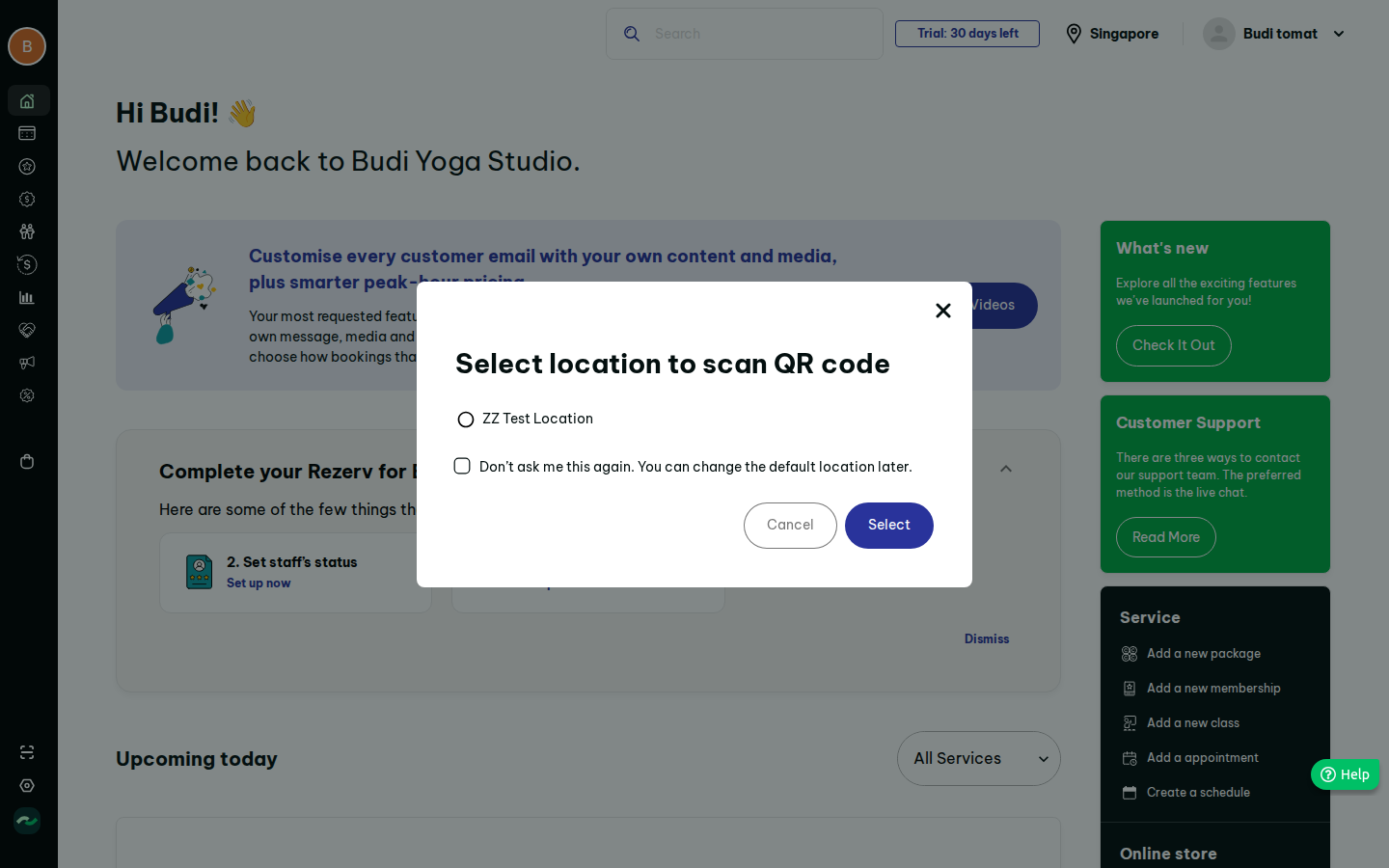
| FR-10-01 | "Scan Customer" action in the sidebar opens a location picker modal (radio list of locations, "remember my choice" checkbox) | must | S18, F08 |
| FR-10-02 | Scanner screen shows "Scanning for {location}", Change Location, close; uses device camera; shows readable error and manual-code fallback when camera is unavailable | must | S18; fallback is our addition |
| FR-10-03 | Picker with zero locations shows empty state linking to location creation; Select disabled until a choice is made, with a visible hint | must | S18 (original did nothing silently) |
| FR-10-04 | Default scan location stored per user; changeable from scanner and profile settings | should | S18 |
| FR-10-05 | Result card after scan: customer name, photo if any, outcome (checked in / access granted / denied + reason), next booking, and a one-tap undo for 10 s | must | not observed in recon |
| FR-10-06 | Scan resolves customer's QR token to: (a) an upcoming booking at that location within its check-in window, else (b) outlet access entitlement, else denied | must | S18, S36 |
| FR-10-07 | Customer QR is a signed, rotating token (no personal data in the payload) | must | security; not observed |
| FR-10-08 | Class settings: check-in mode manual or auto; earliest check-in = anytime or N hours before start | should | S24, class settings |
| FR-10-09 | Appointment settings: segmented manual/auto; earliest check-in anytime or N minutes before | should | S33 |
| FR-10-10 | Course settings (and course option "enable check-in"): auto check-in toggle; window anytime or N hours before | should | S44 |
| FR-10-11 | Per-session override of check-in window in the session's advanced options | could | 01_core S08 advanced |
| FR-10-12 | Auto check-in marks the booking checked-in when the customer is scanned/arrives inside the window; without a scan it never marks attendance silently (see rule 10.3) | must | our interpretation; open question |
| FR-10-13 | Manual check-in button on booking rows (class roster, appointment list) respects the same window unless the user has override permission | should | S12, 08 gapfill |
| FR-10-14 | Outlet access list: per location, assigned pricing plans (membership/package tag), search, location filter | should | S37, S37b |
| FR-10-15 | Add plans to a location: pick location, search, select all, plans grouped by category, Add | should | S38, F17 |
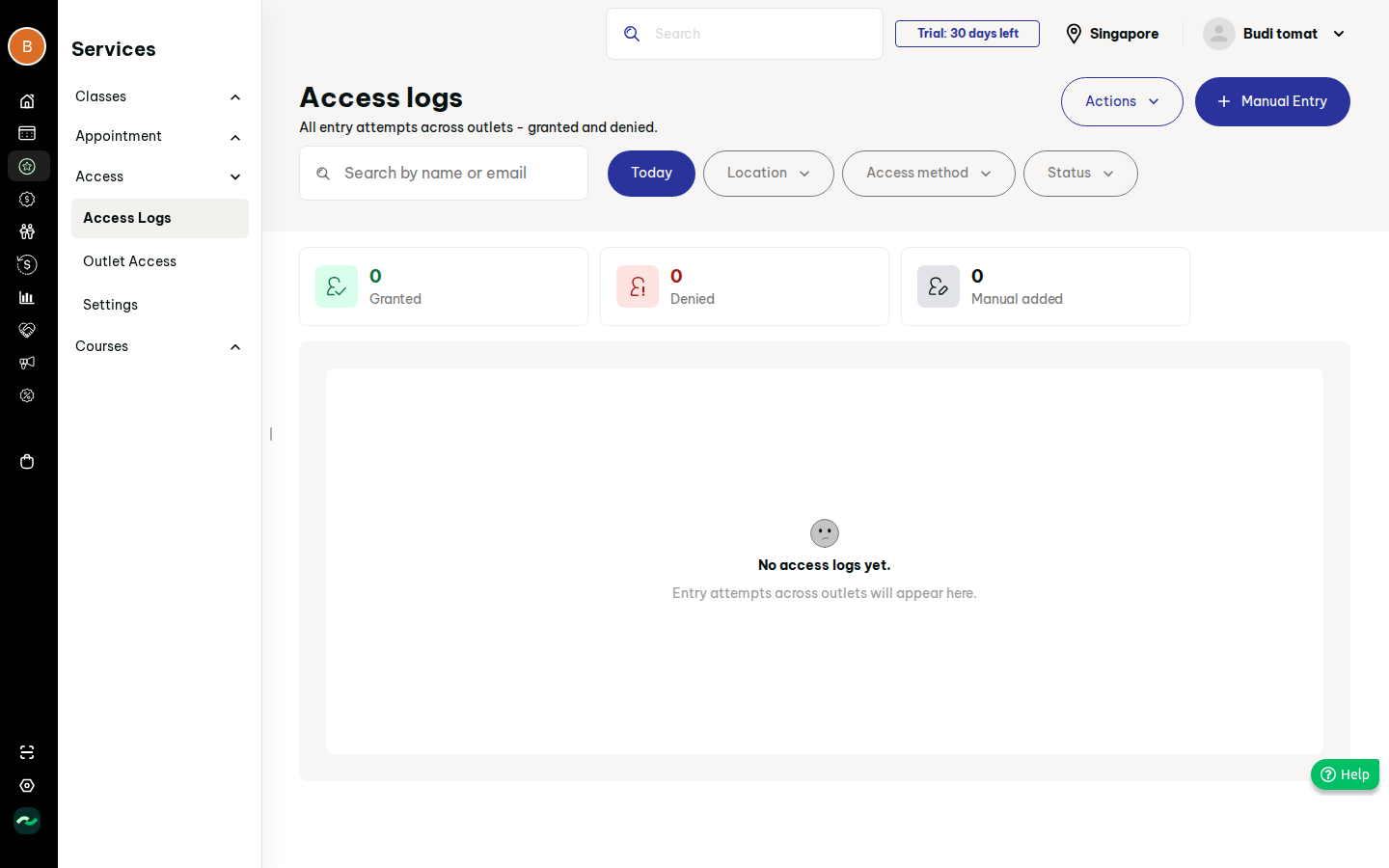
| FR-10-16 | Access log list: columns customer, location, method (booking/membership/manual), status (granted/denied/cancelled), time; search by name/email, date, location, method, status filters | should | S36 |
| FR-10-17 | Stat tiles over the filtered range: granted, denied, manually added | should | S36 |
| FR-10-18 | Manual entry: choose existing customer or create new, location, note; logged as manual with the staff user | should | S36b, F16 |
| FR-10-19 | Audit trail of a log row (who/when/what changed) | could | S36c |
| FR-10-20 | Bulk import of access entries via CSV with downloadable template | could | S36c |
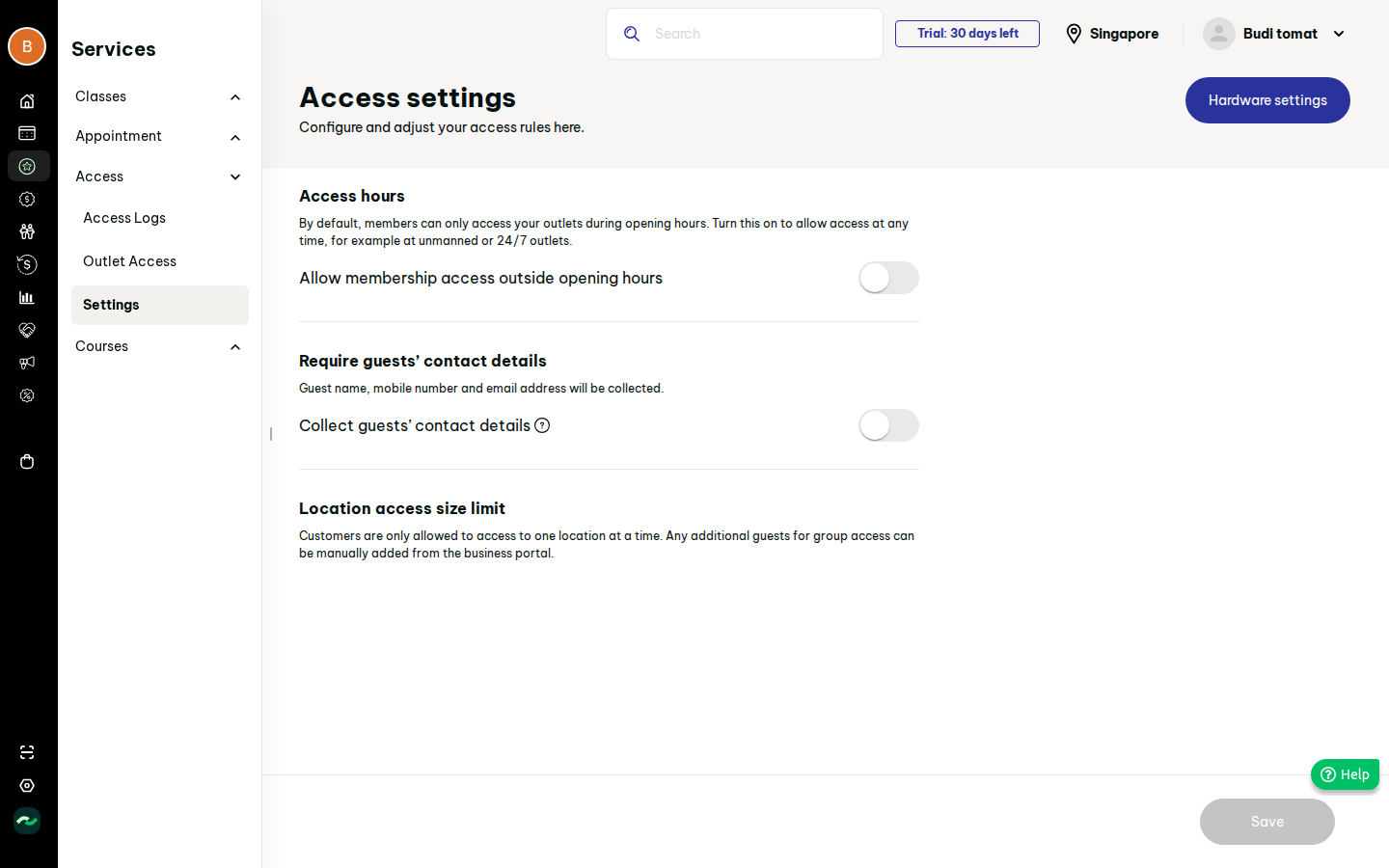
| FR-10-21 | Access setting "allow membership access outside opening hours" (default off); when off, outside-hours scans are denied with reason | should | S39, F16 |
| FR-10-22 | Access setting "collect guest contact details" (name, mobile, email) when a guest is added | could | S39 |
| FR-10-23 | Downloadable PDF with one QR page per location (location name + QR); button shows downloaded state | should | S19 |
| FR-10-24 | Hardware settings button links to PRD 15 hardware integration | could | S39, S39b |
7. Screens
- Scan modal + scanner (S18): states picker-empty, picker-filled, scanning, camera-error, result (success/denied).
- Access logs (S36) and add entry (S36b): empty, filtered, filled, error.
- Outlet access list (S37) and add plans (S38).
- Access settings (S39).
- Check-in sections inside class, appointment, course settings (S24, S33, S44) — owned by their PRDs; this PRD owns the fields' semantics.
- Locations page "Download QR" button (S19), owned by PRD 01 UI.
8. Flows
Scan: sidebar Scan -> (location modal skipped if remembered) -> scanner -> scan -> result. Original 3 clicks; target 1-2 after first time. Plan mapping: Access > Outlet access > Add plans > location > tick > Add (about 5 clicks). Manual entry: Access logs > Manual entry > customer > Save. Edge cases: expired/invalid QR; customer with no entitlement; scanning for the wrong location (deny with the right location suggested); duplicate scan within 60 s (idempotent, shows "already checked in"); offline camera; booking cancelled; customer suspended.
9. Data model
- AccessLog: id, customer_id, location_id, method (booking|membership|manual), status (granted|denied|cancelled), reason, booking_id?, created_by (staff, for manual), at.
- OutletAccessPlan: location_id, pricing_plan_id (membership|package).
- AccessSettings (per business): allow_outside_hours, collect_guest_details.
- Check-in config fields (owned by class/appointment/course settings): auto_check_in bool, earliest_minutes (null = anytime).
- Booking.checked_in_at, checked_in_by (staff|auto|customer).
- UserPreference: default_scan_location_id.
- CustomerQrToken: customer_id, secret/rotation (guess).
10. Business rules & edge cases
10.1 Entitlement order: matching booking in window first, then outlet access plan, else denied. 10.2 A plan grants access only if active, not expired and has credits (for packages). 10.3 Auto check-in never records attendance without an event (scan, geofence or customer tap); "auto" means the window opens automatically and a scan is accepted without staff confirmation. Alternative reading (time-based auto mark) is an open question. 10.4 Outside opening hours (location hours and holidays from PRD 01): denied unless setting FR-10-21 is on and the plan is a membership. 10.5 Check-in earlier than window start: rejected with the time it opens. 10.6 Denied attempts are always logged. 10.7 Manual entries are flagged and attributed to the staff member.
11. Permissions
- Scan, manual check-in: Schedule/Bookings edit or "Access logs" edit.
- Access logs view: Services > Access > Access logs view; manual entry/import: edit.
- Outlet access + settings: Services > Access > Outlet access/Settings edit.
- "Override restricted plan" permission allows admitting without entitlement (reason required).
- QR PDF download: Settings > Locations view.
- Check-in window settings: edit on the owning service settings.
12. Acceptance criteria
- AC-01: Given a valid customer QR with a booking starting in 20 min and window 30 min, when scanned at the booking's location, then the booking is checked in and a granted log row exists.
- AC-02: Given the same booking and window 10 min, then the scan is rejected with "opens in 10 min" and a denied log row exists.
- AC-03: Given a membership mapped to location L, when scanned at L inside opening hours, then access is granted; at other location, denied.
- AC-04: Given outside-hours off, when a member scans after closing, then denied with reason "outside opening hours".
- AC-05: Given remember-location was ticked, when I open Scan again, then the scanner starts directly at that location.
- AC-06: Given a camera error, then a message and manual code entry are shown.
- AC-07: Given 3 granted, 1 denied, 2 manual rows in range, then tiles show 3 / 1 / 2.
- AC-08: Given a user without Access edit, then manual entry returns 403.
- AC-09: Given two locations, the PDF has two QR pages with the matching location names.
13. Dependencies & open questions
Depends on PRD 01, pricing plans, services PRDs. Open:
- Result UI after scan was not observable (headless, no camera): our result card is a design guess.
- What happens when a customer scans the printed location QR was not observed.
- Meaning of "auto check-in" (see 10.3).
- "Location access size limit" section had no controls; capacity logic is Later.
- Access log columns were not observed (empty data); columns are inferred.
- Whether access consumes package credits per entry.
- Camera library choice (web) and fallback on desktop.
14. Evidence
See evidence/evidence.md.