PRD 11 — Notifications
Status: draft · Priority tier: P1 · Size: L · Depends on: auth/user (existing), PRD 01 (business settings, sender, locations, staff/roles), PRD 02–05 (bookings), PRD 06 + 08 (plans, sales)
1. Summary
Transactional email for customers (35 events, per-event on/off, editable text) and for staff (event toggles plus per-person recipients), a sender identity with domain verification, one email theme for branding, and a sent history with delivery and open status. Extends the existing internal/mail (SMTP) and internal/template (embedded OTP template); OTP login mail stays as-is and is not tenant-editable.
2. Problem & goals
Studios must tell customers about bookings, payments and memberships without manual work, in the studio's own voice and from the studio's own address. Goals:
- Every listed domain event produces at most one email per recipient, within 60 s of the event (p95).
- Owner can turn an event off, change subject/title/message and send a test in <= 5 clicks.
- 100% of sends recorded in history with status (queued, sent, delivered, bounced, failed) and opened where the provider reports it.
- Zero sends from an unverified sender domain (falls back to platform sender). Non-goals: marketing campaigns and automations (PRD marketing), drag-drop email builder, push/WhatsApp, full HTML editing of templates.
3. Users & roles
Owner/admin (configures everything), staff (receives staff notifications; may view history if permitted), front desk (view history), customer (receives email; no UI here except unsubscribe-exempt transactional notice).
4. Scope
In (v1)
- must: 35 customer events with default toggles; global enable/disable per event.
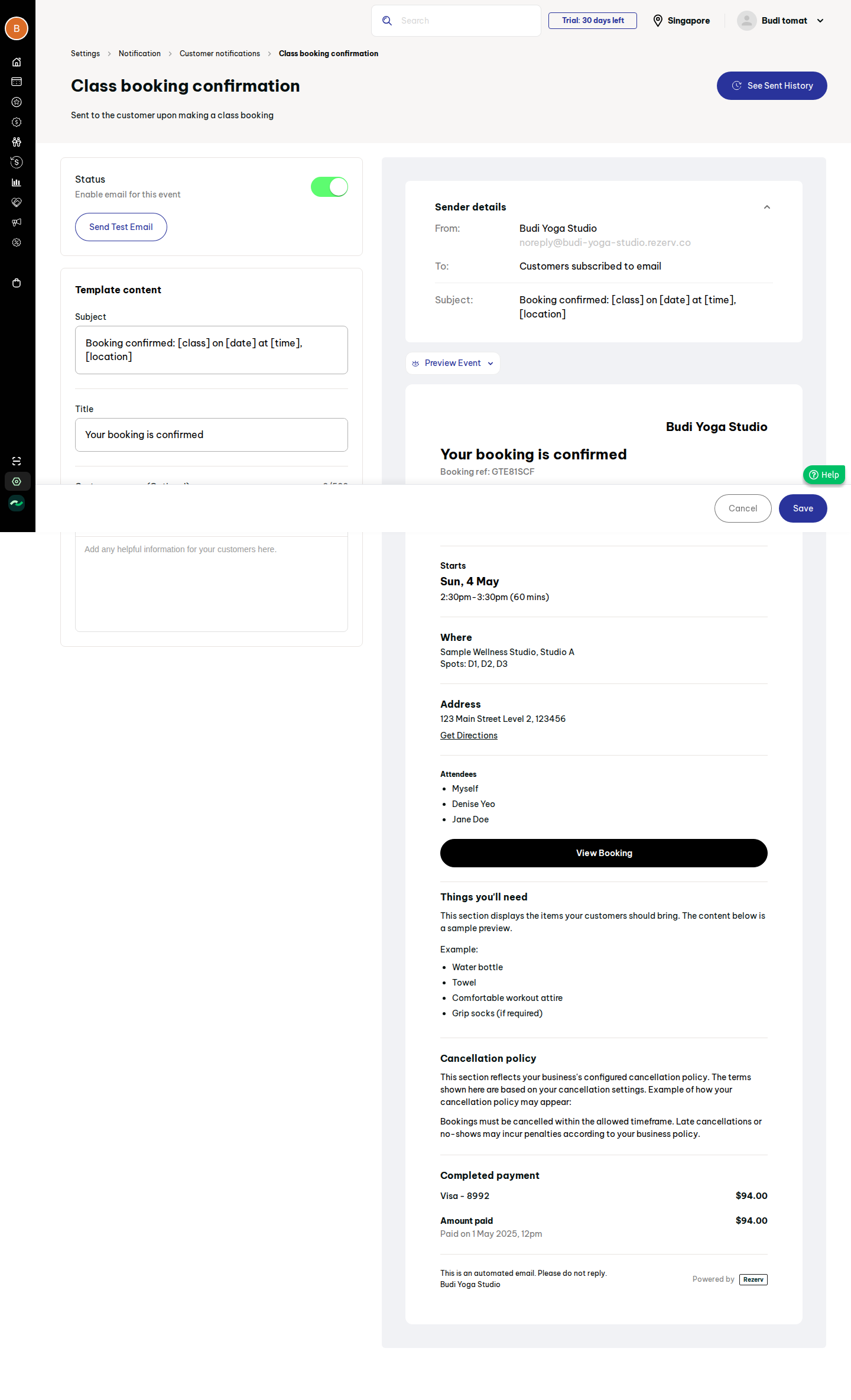
- must: event template editor: subject, title, custom message (max 500), placeholders, live preview, test email.
- must: sender email + domain verification (DNS records, status), fallback platform sender.
- must: staff notification events + recipients (staff x category).
- must: email theme (logo, logo height, 3 colours) applied to all templates.
- must: sent history (customer emails) with filters + CSV export.
- should: delivery / bounce / open tracking via provider webhooks.
- should: per-booking "events log" entry linking to the sent email (S209l).
-
should: quiet failure handling: retries with backoff, dead-letter status. Later (v2+)
-
could: SMS (templates per event, provider integration, per-customer consent), WhatsApp.
- could: localisation of templates; per-location sender.
-
could: history tabs for Campaign / Automation once marketing exists. Out
-
Original's "Powered by" footer: whether we show our own is a pricing-tier decision (TBD).
- Reverse-engineering the original's provider; we pick our own (SMTP now, API provider later).
5. User stories
- US-11-01 As an owner, I want to switch individual customer emails on or off so that customers get only what I want.
- US-11-02 As an owner, I want to edit subject, title and a custom message with placeholders so that emails sound like my studio.
- US-11-03 As an owner, I want to send myself a test email so that I can check it before saving.
- US-11-04 As an owner, I want mail to come from my own address and domain so that it is trusted and not spam-filed.
- US-11-05 As an owner, I want one logo and colour theme for all emails so that branding is consistent.
- US-11-06 As an owner, I want to choose which staff get which kinds of internal alerts so that the right person sees new bookings or failed payments.
- US-11-07 As front desk, I want to look up whether a customer got an email and whether it was opened so that I can answer "I never got it".
- US-11-08 As an owner, I want to export history as CSV for audits.
6. Functional requirements
| ID | requirement | pri | evidence |
|---|---|---|---|
| FR-11-01 | Define a fixed catalogue of 35 customer events (below) in code, each with key, category, description, default status, default subject/title, allowed placeholders | must | S156b |
| FR-11-02 | Per-business per-event override: status, subject, title, custom message; unset = default | must | S156b, S156c |
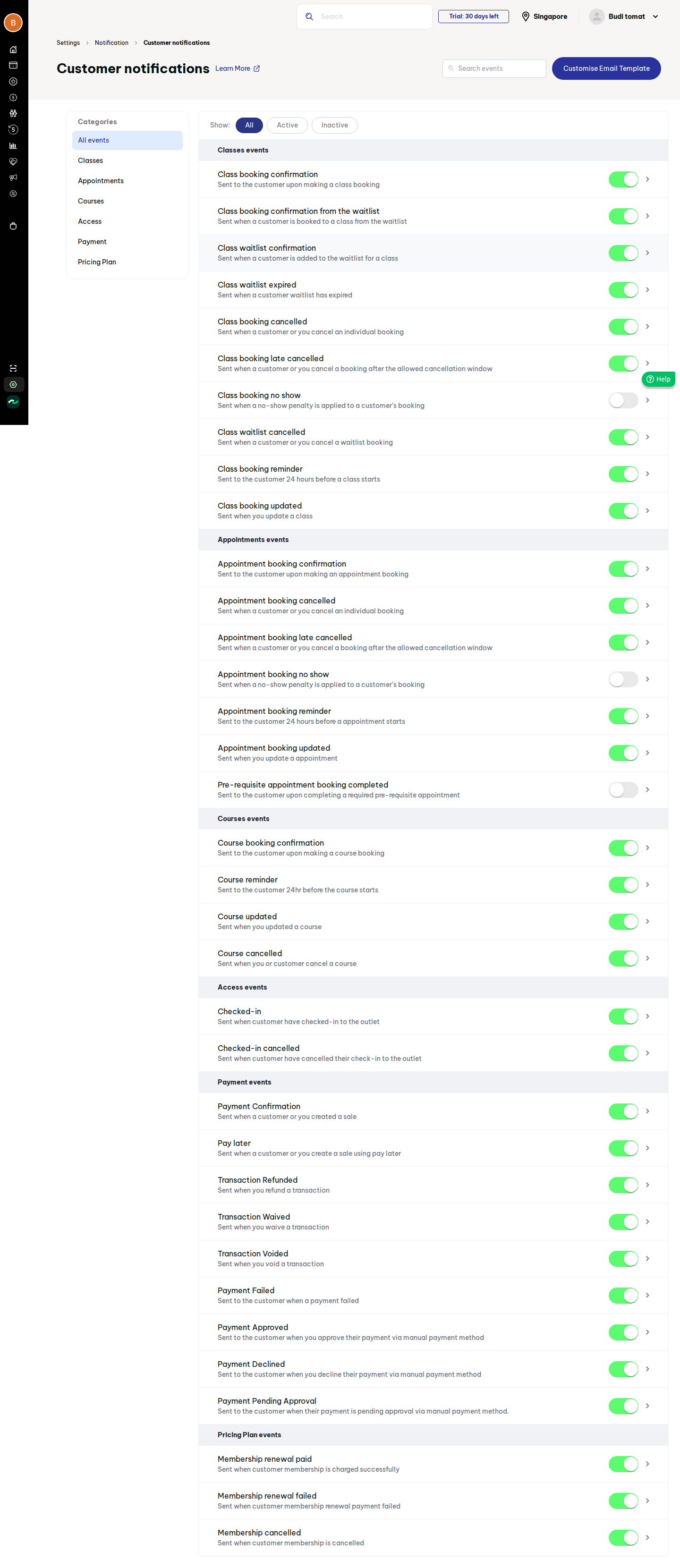
| FR-11-03 | Customer list screen: categories rail (All, Classes, Appointments, Courses, Access, Payment, Pricing Plan), Show All/Active/Inactive, search by name, inline toggle, row opens editor | must | S156b |
| FR-11-04 | Toggle persists immediately, with optimistic UI and rollback on error | must | S156b |
| FR-11-05 | Editor: status, subject, title, custom message (optional, max 500, plain text with line breaks), Save/Cancel; Save disabled until a change | must | S156c |
| FR-11-06 | Placeholders in subject/title/message: [class] [date] [time] [location] plus per-event additions (customer, appointment, course, plan, amount); unknown placeholder rejected on save; empty value renders as empty string | must | S156c |
| FR-11-07 | Live preview with sample data, "preview as event" switcher, desktop/mobile width | should | S156c |
| FR-11-08 | Send Test Email to the current user's address, with sample data, marked "[Test]" in subject, not written to customer history (written as type=test) | must | S156c |
| FR-11-09 | Email theme: logo upload (JPG/PNG/GIF <= 500 KB), logo height (px, default 60, bounded 20-120), button text, button background, outlined-button colours (hex); live preview; applies to all templates | must | S156d |
| FR-11-10 | Template body is composed server-side from an event layout + theme; custom message inserted escaped (html/template); no raw HTML input | must | S156c; internal/template |
| FR-11-11 | Optional featured image and footer text in email theme | could | S85b |
| FR-11-12 | Sender settings: sender email (default noreply@ |
must | S156 |
| FR-11-13 | Domain verification: on sender-domain entry, show DNS records to add (SPF, DKIM, optionally DMARC), "Verify" button re-checks; status Authenticated/Pending/Failed | must | S156 (status only observed) |
| FR-11-14 | Until verified, send from platform address with reply-to = sender email; once verified, From = sender email | must | derived |
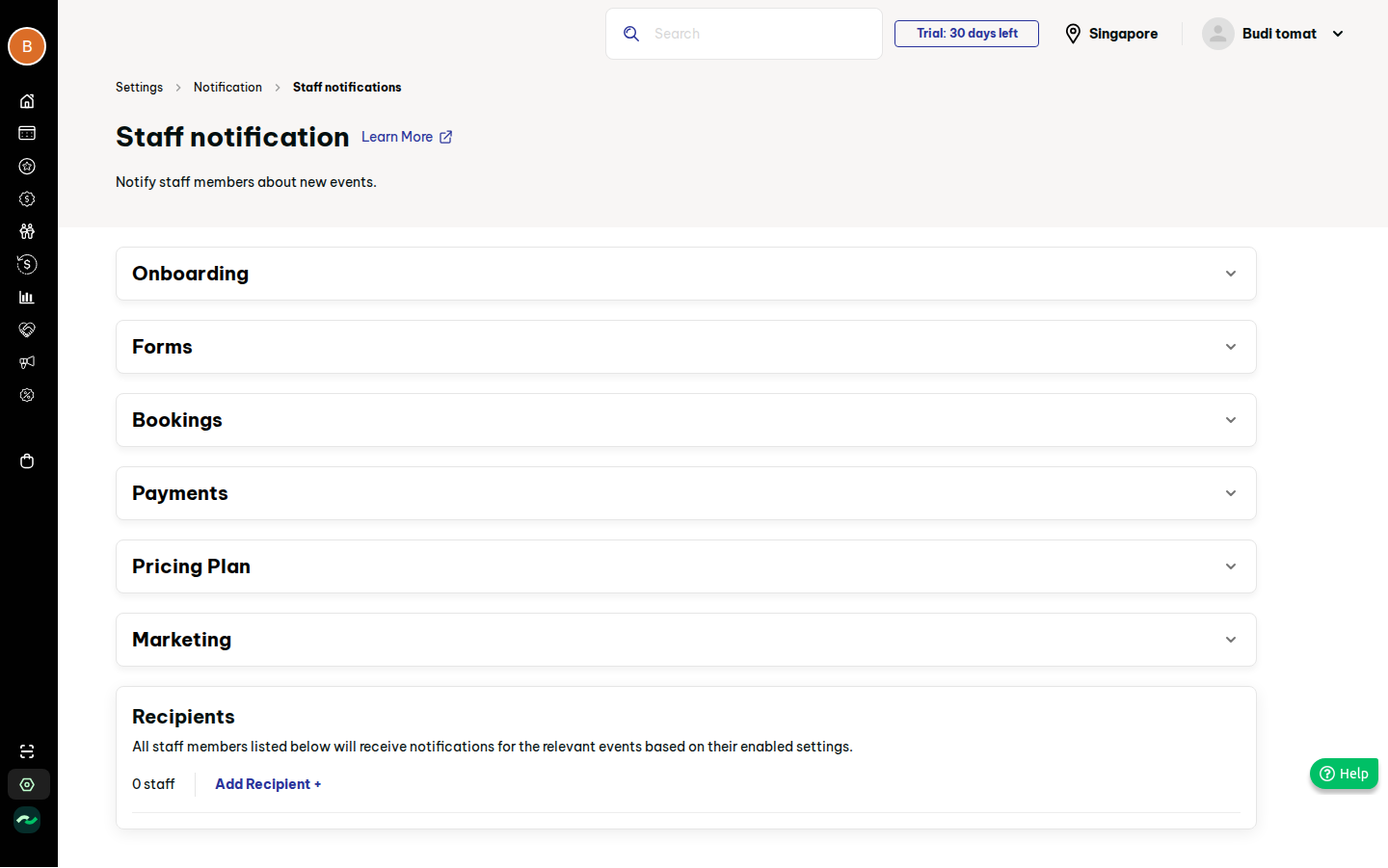
| FR-11-15 | Staff events catalogue (list below; 20 non-marketing events) with per-event toggle, grouped in accordions | must | S156e, S156g |
| FR-11-16 | Recipients: list of staff with category checkboxes (select all), Add/Edit/Remove; a recipient gets an event only if its category is ticked and the event is on | must | S156e, S156h |
| FR-11-17 | Staff emails use a plain internal layout (not customer theme); link back to the relevant record | should | derived |
| FR-11-18 | Dispatch: domain services emit an event (key, business, recipient, payload); a dispatcher checks status, renders, enqueues; services never call mail directly | must | derived |
| FR-11-19 | Async delivery via a DB-backed queue with retries (3, exponential), idempotency key (event key + entity id + recipient) | must | derived |
| FR-11-20 | Reminder events (class/appointment/course, 24 h before) scheduled by a job; rescheduling/cancelling the booking supersedes the pending reminder | must | S156b |
| FR-11-21 | Sent history: rows time, recipient email, event, subject, status, opened; search by email, filter by event and date range (default today), paginate, Export CSV (current filter) | must | S156f |
| FR-11-22 | Delivery and open tracking via provider webhook (delivered, bounced, complained, opened); open pixel opt-in per business | should | S156f (not observed with data) |
| FR-11-23 | "See Sent History" link from the editor opens history pre-filtered to that event | should | S156c |
| FR-11-24 | Booking/transaction detail shows an events log with sent emails (type, time) | should | S209l |
| FR-11-25 | Suppression: hard-bounced or complained addresses are skipped and logged as suppressed | should | derived |
| FR-11-26 | Failed/blocked sends are visible in history with reason; no silent drops | must | derived |
| FR-11-27 | Existing OTP email path moves onto the same sender/queue but keeps fixed platform template; not editable, not toggleable, not in history list | should | internal/auth/delivery.go |
| FR-11-28 | SMS: channel field on template and history reserved in the schema; no UI in v1 | could | CSV: no SMS in Notification |
Customer events (default ON unless noted):
- Classes (10): booking confirmation; confirmation from waitlist; waitlist confirmation; waitlist expired; cancelled; late cancelled; no-show (OFF); waitlist cancelled; reminder 24 h; updated.
- Appointments (7): confirmation; cancelled; late cancelled; no-show (OFF); reminder 24 h; updated; pre-requisite appointment completed (OFF).
- Courses (4): confirmation; reminder 24 h; updated; cancelled.
- Access (2): checked in; check-in cancelled.
- Payment (9): payment confirmation; pay later; refunded; waived; voided; failed; approved; declined; pending approval.
- Pricing plan (3): membership renewal paid; renewal failed; membership cancelled.
Staff events (default state not observed; assume ON, see open questions):
- Onboarding: new sign-up. Forms: new contact form submission.
- Bookings: class new booking; class auto-added from waitlist; class cancelled; class late cancelled; class auto-cancelled by system; class cancelled by staff; appointment new/updated/cancelled; course new/cancelled.
- Payments: new payment; membership renewal payment; overdue payment settled; failed recurring charge; card updated.
- Pricing plan: membership cancelled.
- Marketing (quota events 75%/100%, campaign stopped): deferred to the marketing PRD; catalogue entries added there.
7. Screens
| our screen | modelled on | states |
|---|---|---|
| Notifications hub (sender card + 3 cards) | S156 | loading, filled, sender unverified, domain pending/failed |
| Customer notifications list | S156b | loading, filled, filter-empty, error + retry |
| Event editor | S156c | pristine, dirty, saving, validation error (bad placeholder, >500), test sent |
| Email theme editor | S156d | default, dirty, upload error (size/type) |
| Staff notifications | S156e/g | collapsed, expanded, no recipients (empty), saving |
| Add/Edit recipient modal | S156h | empty, filled, duplicate staff error |
| Sender domain verification panel | new (S156 badge only) | none, pending with records, verified, failed |
| Sent history | S156f | empty ("no data for filter"), filled, loading, error |
8. Flows
- Edit one email: list -> row -> change subject -> Save (3 clicks) -> optional Send Test (1 click). Original: same.
- Toggle event: 1 click on list.
- Verify domain: hub -> enter sender email -> Save -> copy records -> (DNS outside product) -> Verify.
- Add recipient: Add -> choose staff -> tick categories -> Add (4 clicks).
- Edge: editing an event while it is off still saves; booking cancelled after reminder queued cancels the reminder; sender changed after verify resets to Unverified; test email fails if mail not configured (
MAIL_URLempty discards sends, UI must say "mail not configured", not "sent").
9. Data model (guesses marked)
notification_setting(business_id, event_key, channel='email', enabled, subject, title, message, updated_by, updated_at)PK (business, event_key, channel). Catalogue itself is code, not a table.email_theme(business_id, logo_asset_id, logo_height, btn_text, btn_bg, btn_outline, footer_text?)(one row).sender_identity(business_id, email, domain, status, dns_records json, verified_at, provider_ref)(guess).staff_notification_setting(business_id, event_key, enabled);staff_notification_recipient(id, business_id, staff_id, categories text[]).email_outbox(id, business_id, event_key, entity_type, entity_id, recipient, subject, body_ref, status, attempts, next_attempt_at, provider_msg_id, error, idempotency_key unique, created_at).email_event(outbox_id, type delivered|bounced|complained|opened, at, meta)(guess).email_suppression(business_id, address, reason, at)(guess). Migrations followdb/migrations/NNNNN_<plural>.sql; domain packageinternal/notification(singular).
10. Business rules & edge cases
- A disabled event sends nothing and writes no history row.
- Recipient is the customer's login/contact email; customers without email are skipped with history status "no address".
- Custom message is escaped; line breaks preserved; max 500.
- Subject max 150 chars after placeholder expansion; truncation not silent: validation error on save for template, truncate at send with log in history.
- Time in reminders and body uses the business/location time zone.
- Duplicate events (retry/webhook replay) collapse via idempotency key.
- Late-cancel vs cancel decided by cancellation policy (service PRD); notification only reacts.
- Deleting a staff member removes recipients.
- Never log message bodies or secrets (provider keys, DNS tokens).
11. Permissions
| action | owner | admin | staff | front desk |
|---|---|---|---|---|
| Edit templates, theme, sender, toggles | yes | yes (role-matrix key "Settings > Notifications": edit) | no | no |
| View settings | yes | yes | view-only if granted | no |
| View sent history | yes | yes | if granted | if granted (view) |
| Receive staff notifications | configurable per person | |||
Routes live in the use: [auth] group; matrix granularity follows the staff-roles PRD (open question). |
12. Acceptance criteria
- Given default settings, when the list loads, then 35 events are shown and exactly 3 are inactive (class no-show, appointment no-show, pre-requisite appointment completed).
- Given class confirmation is on, when a customer books, then one email is queued within 60 s and a history row exists.
- Given the event is off, when the trigger occurs, then nothing is queued.
- Given a subject with
[bogus], when saving, then it is rejected with a message naming the placeholder. - Given a custom message of 501 chars, then Save is blocked.
- Given an unverified sender domain, when an email is sent, then From is the platform address and Reply-To is the sender.
- Given a webhook "bounced" for a message, then history shows Bounced and later sends to that address are suppressed.
- Given a recipient with only "Payments" ticked, when a new class booking occurs, then they get no email; when a payment is received, they do.
- Given a logo of 600 KB, then upload is rejected with the size rule.
- Given a history filter by date range and event, when Export CSV, then the file contains only matching rows.
- Given
MAIL_URLempty, when Send Test Email is clicked, then the UI reports mail is not configured.
13. Dependencies & open questions
- Depends on event sources from bookings, sales, memberships, check-in modules; on file/media storage for logo; on staff/roles.
- Open: sending provider for production (SMTP only today; webhooks for delivery/open need an API provider); domain verification mechanism (provider API vs manual DNS check); staff-event default states (not observed); exact staff event list for appointments "waitlist" etc.; whether staff recipients can be non-staff addresses; open-tracking privacy/consent; SMS provider and pricing tier (TBD); email-sending quotas per plan (pricing tier: TBD); what history shows for the sent body (store rendered HTML vs re-render); retention period.
- Recon gaps: delivery/open states were never seen with data; sender-verification workflow not observed beyond badges; staff email bodies not observed.
14. Evidence
See evidence/evidence.md.