PRD 05 — Courses
Status: draft · Priority tier: P1 · Size: L · Depends on: Locations & Facilities, Staff, Customers, Pricing Groups (customers), Sales/Payments, Settings (check-in), Storefront
1. Summary
Multi-session or one-off courses, workshops and events sold as tickets: an 8-step course wizard (onsite/online/hybrid, facilitators, dates, expectations, what to bring, options, tickets with pricing groups and sales windows), course settings (levels, check-in, guest contact) and a course bookings list.
2. Problem & goals
Studios run workshops/teacher trainings that need ticketing, not drop-in class credits. Goals: create a course with one ticket in <= 20 clicks (original ~20); ticket sales open/close automatically; no oversell (quantity enforced); course auto-cancels when minimum tickets are not sold (if enabled). Non-goals: plan-limit enforcement (original capped trial at 2 courses; pricing tier: TBD); bookings creation from admin (original has no add button — see open questions); storefront pages (Storefront PRD); payment processing.
3. Users & roles
Owner/manager (author, settings), front desk (view bookings, check in), facilitator/staff (listed on course), customer (buys tickets).
4. Scope
In (v1)
- must: course list by category (status/category filters), category CRUD; 8-step wizard; draft/edit/duplicate/set inactive/delete.
- must: delivery mode onsite/online/hybrid with location/video link; schedule continuous or specific days; tickets (paid/free, name, pricing-group price, quantity, sales start/end).
- must: course bookings list with filters.
- should: facilitators (staff or guest, custom role label); levels; tags; terms; expectation section; what to bring; purchase limits; eligibility; auto-cancel on min tickets; check-in; guest contact collection; public/private + featured; publish now/later; SEO/slug.
- could: plan limit banner. Later: add booking from admin; attendee management and waitlist; certificates; per-session attendance. Out: none.
5. User stories
- US-05-01 As an owner, I want to describe a course with media, level and terms so that customers know what they buy.
- US-05-02 As an owner, I want to say if it is onsite, online or both so that customers get the right location or link.
- US-05-03 As an owner, I want to list one or more facilitators with my own role label so that teachers get credit.
- US-05-04 As an owner, I want specific days with times or a continuous date range so that any format is possible.
- US-05-05 As an owner, I want several ticket types with different prices per pricing group and sales windows so that I can run early-bird sales.
- US-05-06 As an owner, I want the course cancelled automatically if too few tickets sell so that I do not run a loss.
- US-05-07 As an owner, I want private courses reachable only by link so that I can sell to invited groups.
- US-05-08 As a front desk user, I want to see who bought tickets by date and location so that I can prepare.
6. Functional requirements
| ID | requirement | priority | evidence |
|---|---|---|---|
| FR-05-01 | Course list grouped by category; card: name, status badge, created date; menu Edit, Duplicate, Set inactive, Delete; filters Status, Category. | must | S41, S41e |
| FR-05-02 | Category CRUD + sub-category; a category is needed before creating a course (offer inline creation). | must | S41, F18 |
| FR-05-03 | Wizard with 8 steps and completion %: Details, Where, Who, When, Expect, Bring, Options, Tickets; Back/Next (disabled until valid), Save as draft, final Add. | must | S42, F18 |
| FR-05-04 | Details: name (<=100, required), rich-text description (<=1000, required, heading/quote/video embed), optional image, tags (icon+text), category (required), sub-category, level (from settings), SEO title/description/slug, terms and conditions. | must | S42b |
| FR-05-05 | Where: Onsite (location + facilities), Online (video URL required; optional meeting ID/password), Hybrid (both). Password stored encrypted, shown only to ticket holders and staff*. | must | S42c2, S42c4 |
| FR-05-06 | Who: With facilitator (role label default "Facilitator", editable; add staff or guest facilitator (name, optional photo*); multiple) or No facilitator. | should | S42d |
| FR-05-07 | When: Continuously (start/end date-time; multiple start dates "add another") or Specific days (date + start/end time in 15-min steps, add, per-entry save/remove). At least one date required. End after start. | must | S42e, S42e2 |
| FR-05-08 | Expect: optional free-text with "display this section" toggle. | could | S42f |
| FR-05-09 | Bring: yes/no; items with label, description (<=1000), label image; reorder. | should | S42g |
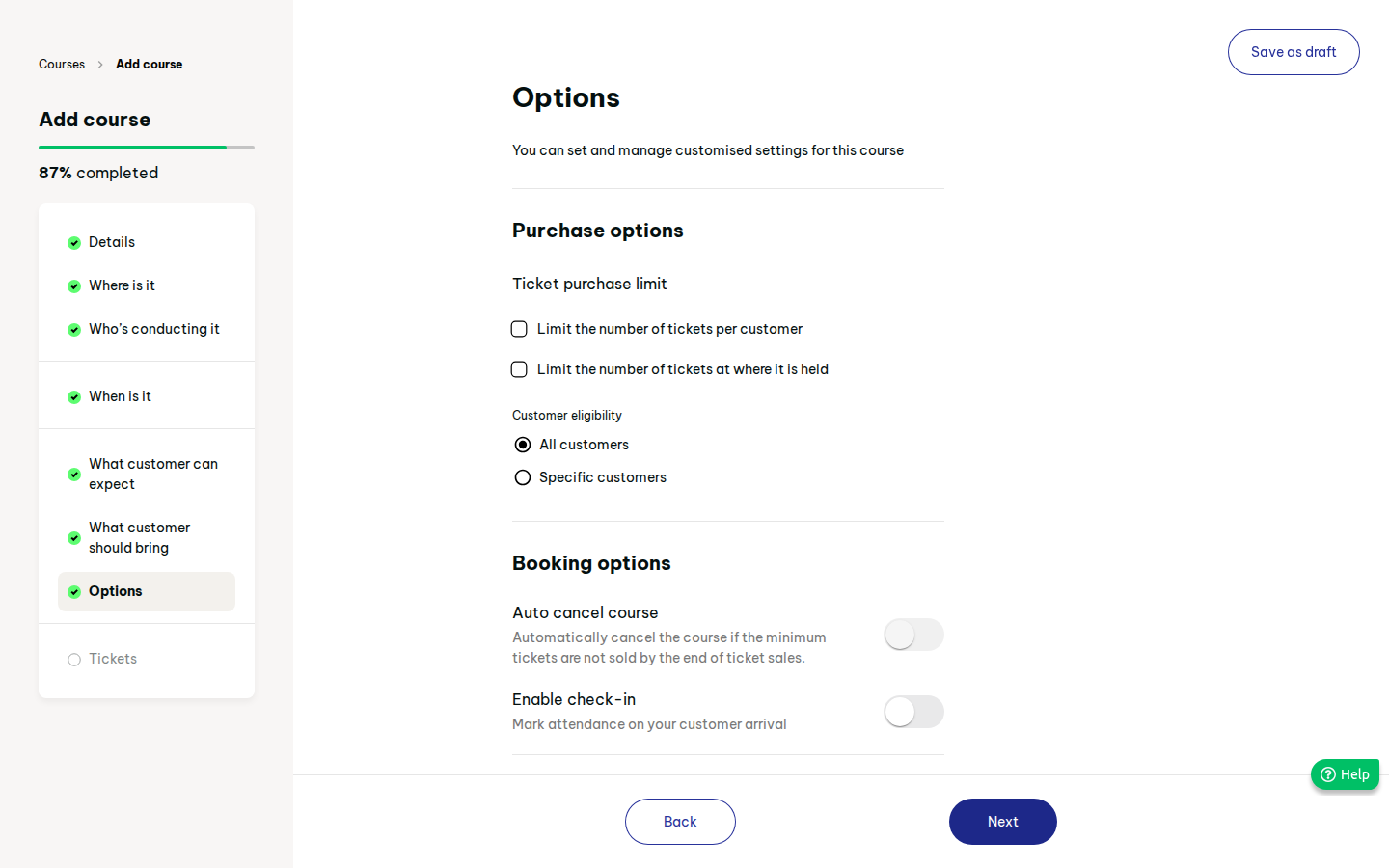
| FR-05-10 | Options — purchase: limit tickets per customer, limit tickets at venue (total), eligibility all/specific customers. | should | S42h |
| FR-05-11 | Options — booking: auto-cancel if minimum tickets not sold (threshold + lead time*), enable check-in, collect guests' contact details. | should | S42h |
| FR-05-12 | Options — publish: Public (optionally pin as featured) or Private (hidden; sell manually/direct link); Publish now or later with visibility date. | should | S42h, S42h2 |
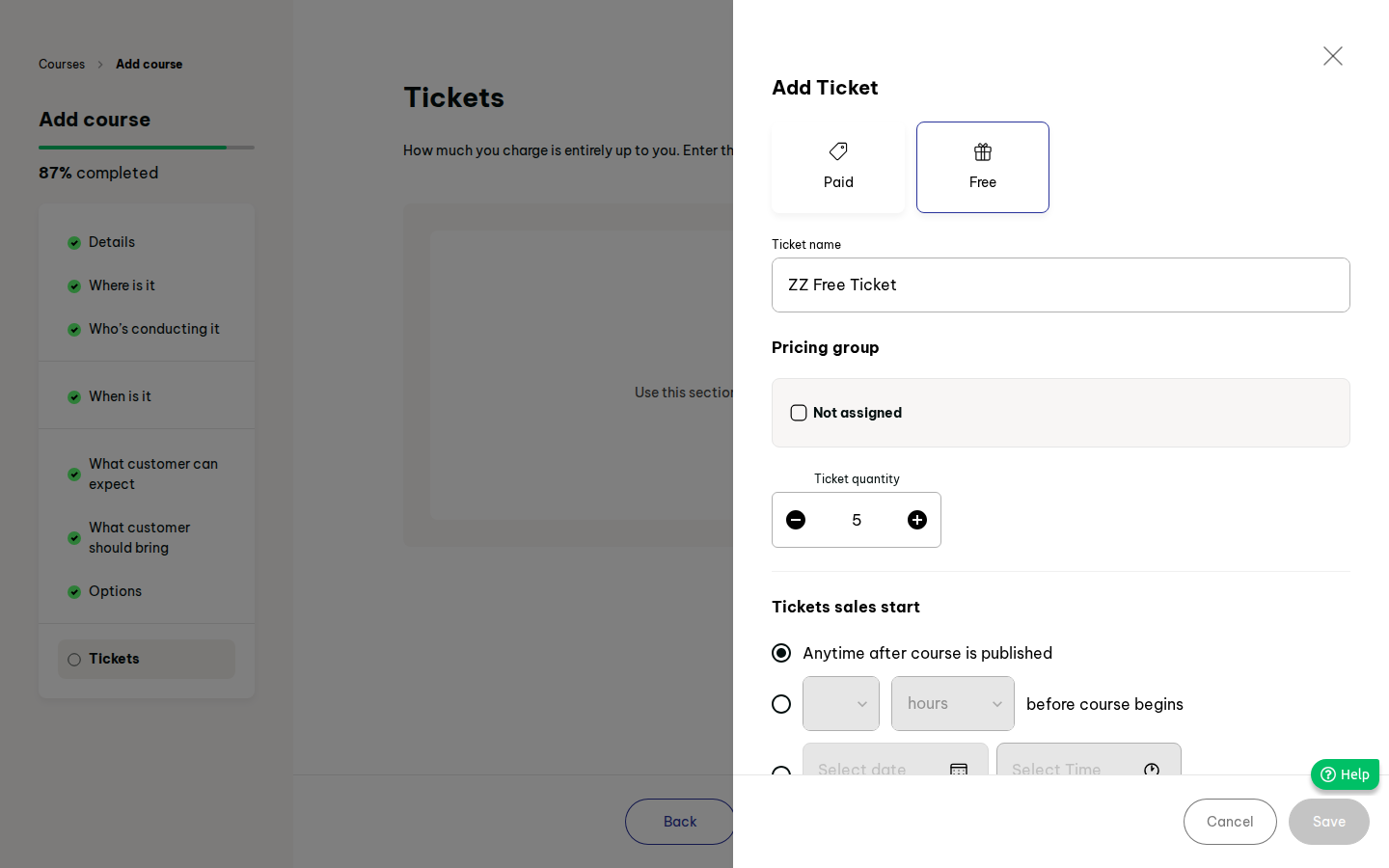
| FR-05-13 | Tickets: Add ticket drawer — Paid/Free, name, price per pricing group (checkbox group reveals price; free shows FREE), quantity, sales start (anytime after publish / N hours before course / date+time), sales end (until course ends / N hours before / date+time). At least one ticket required. | must | S42i, S42j-k |
| FR-05-14 | Ticket list shows name, price(s), quantity, sold count, sale window; edit/delete (delete blocked if sold*). | must | S42k |
| FR-05-15 | Ticket validation: sales end >= sales start, start before course end, quantity >= sold. | must | S42j4 |
| FR-05-16 | Course lifecycle: Draft, Active, Inactive; Inactive hides from store and stops new sales but keeps bookings. Delete confirm explains consequences. | must | S41e |
| FR-05-17 | Duplicate copies all fields and tickets but not dates (assumption), as a Draft. | should | S41e |
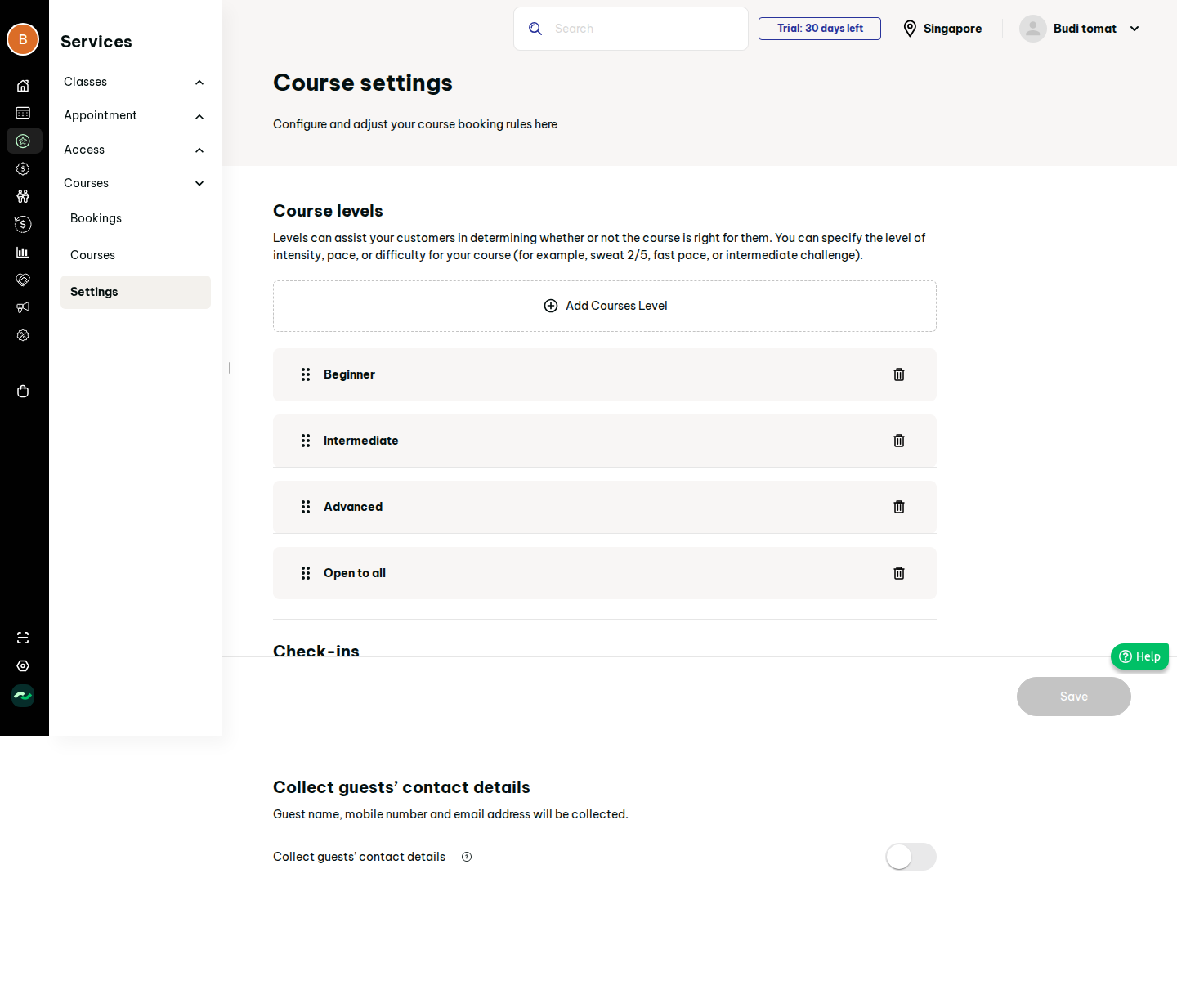
| FR-05-18 | Course settings: levels CRUD (defaults Beginner, Intermediate, Advanced, Open to all; drag reorder), auto check-in toggle + window (Anytime or N hours before), collect guests' contact details (name, mobile, email) default. | should | S44, S44b, S44c |
| FR-05-19 | Course bookings list: search customers, date presets, Location, Staff, More filters (Status, Course), Reset, 100 per page, empty state. Columns* course, date, customer, ticket, qty, status. | must | S40 |
| FR-05-20 | Purchases decrement ticket quantity atomically; sold-out ticket shows sold out publicly. | must | S42j |
| FR-05-21 | Auto-cancel: if min tickets unsold at the lead time, course is cancelled, buyers refunded per refund rules and notified. | should | S42h |
| FR-05-22 | Plan limit banner "used N of M courses" when a pricing-tier cap applies. | could | S41 |
7. Screens
| Our screen | Modelled on | States |
|---|---|---|
| Course list | S41 | empty, limit banner, filled, filtered |
| Course wizard (8 steps) | S42 | each step invalid/valid; mode variants; date picker/time picker; ticket drawer |
| Ticket drawer | S42j | paid, free, validation errors |
| Course settings | S44 | default, dirty, add-level drawer |
| Course bookings | S40 | empty, filled, loading |
8. Flows
Create: List > Add Course > details > where > who > when > expect > bring > options > tickets (+ Add ticket > Save) > Add. Edges: Next blocked on missing required fields; online needs URL, onsite/hybrid need location; specific-day entry must be saved before Next; no tickets blocks Add. Settings: levels/check-in/guest contact > Save.
9. Data model (guesses marked *)
- Course(id, name, slug, description, image, tags[], category_id, subcategory_id, level_id, seo, terms, mode onsite|online|hybrid, location_id, facility_ids[], video_url, meeting_id, meeting_password, facilitator_label, expect_text, show_expect, bring_items[], per_customer_limit, venue_limit, eligibility, customer_ids[], auto_cancel_min, auto_cancel_lead, checkin_enabled, collect_guest_details, visibility public|private, featured, publish_at, status)
- CourseFacilitator(course_id, staff_id|null, guest_name*)
- CourseDate(course_id, kind continuous|specific, starts_at, ends_at)
- CourseTicket(id, course_id, name, type paid|free, prices[{pricing_group, price}], quantity, sold*, sales_start_rule/at, sales_end_rule/at)
- CourseSettings(business_id, levels[], auto_checkin, checkin_window, collect_guest_details)
- CourseBooking(ref, course_id, ticket_id, customer_id, qty, guests[], status*, transaction_id)
10. Business rules & edge cases
- Names unique per business*. Free ticket price = 0 and shown as free.
- Sales window defaults: start anytime after publish, end when course ends.
- Course with multiple dates: ticket buys the whole course (not per date) — assumption.
- Private courses are excluded from storefront lists/search but reachable by link; featured only applies to public.
- Per-customer limit counts across purchases.
- Guests' contact data collected only if enabled; stored for staff only.
- Timezone = business; online meeting details hidden from non-buyers.
11. Permissions
Owner/manager: create/edit/settings. Front desk: view bookings, check in. Staff: view own courses*. Customer: purchase only. Role matrix in Roles PRD.
12. Acceptance criteria
- Given Online mode without a video URL, then Next is disabled; with a URL it enables.
- Given Specific days and one date entry not saved, then Next stays disabled.
- Given a ticket qty 5 with 5 sold, then the public course shows it sold out and new purchase is refused.
- Given sales start in the future, then purchase is refused before it and allowed after.
- Given auto-cancel min 3 and 2 sold at the deadline, then the course becomes cancelled and 2 buyers are notified.
- Given Private visibility, then the course is absent from the public listing but loads by direct link.
- Given a course set Inactive, then new purchases are blocked and existing bookings remain.
- Given settings Save without changes, then the button is disabled.
- Given bookings filter Location = X and date = this month, then only matching bookings show.
13. Dependencies & open questions
Open questions
- How are course bookings created — only via storefront? Original has no add button; admin sale via Sales "Course" item type exists but was not walked.
- Booking list columns, statuses and detail drawer not observed (empty state only).
- Auto-cancel timing and refund handling not observed.
- Guest facilitator fields; meeting-password visibility not observed.
- Multi-date semantics: per-date attendance/check-in not observed.
- Pricing-group source (Customers/Pricing PRD) and tax on tickets.
- Plan limit amount and gating: pricing tier TBD.
- "Tag" icon set and "limit tickets at venue" exact meaning (assumed total on-site cap).
14. Evidence
See evidence/evidence.md.