PRD 01 — Workspace Foundation
Status: draft · Priority tier: P0 · Size: L · Depends on: existing auth/profile (email-OTP + Google login, JWT, user profile)
1. Summary
The base every other module hangs off: the business workspace and its locations (with rooms and equipment), opening hours, holidays, taxes, staff with roles and a permission tree, staff shift hours / resource availability, and the admin shell (sidebar, top bar, dashboard with an onboarding checklist). Nothing else (classes, bookings, sales) can be created until a location, room and staff exist, so this module is the critical path.
2. Problem & goals
Problem: a studio owner needs to describe the business once (where, when, who, tax) and then give staff only the access they need. Goals:
- A new owner reaches "first bookable slot possible" (location + room + staff + shift) in under 15 minutes using the checklist (measure: time from signup to checklist all-done).
- Every settings page reachable in 1 click from the settings hub; every dashboard checklist tile in 1 click.
- Permission checks enforced server-side on 100% of new routes (CLAUDE.md: protected only via
use: [auth]group). Non-goals: billing/subscription plans, payment providers, notification templates, waivers, wallet, membership rules, checkout rules (separate PRDs); multi-business "Organisation" (Out).
3. Users & roles
- Owner: full access, created at signup; cannot be deleted or demoted.
- Admin (system role): all permissions, assigned by the owner.
- Custom-role staff (manager, front desk, instructor): subset defined by the permission tree.
- Customer: no access to this module (sees location, hours and holidays on the storefront, PRD elsewhere).
4. Scope
In (v1)
- must: Business info (name, slug, logo, contact, address, currency, timezone).
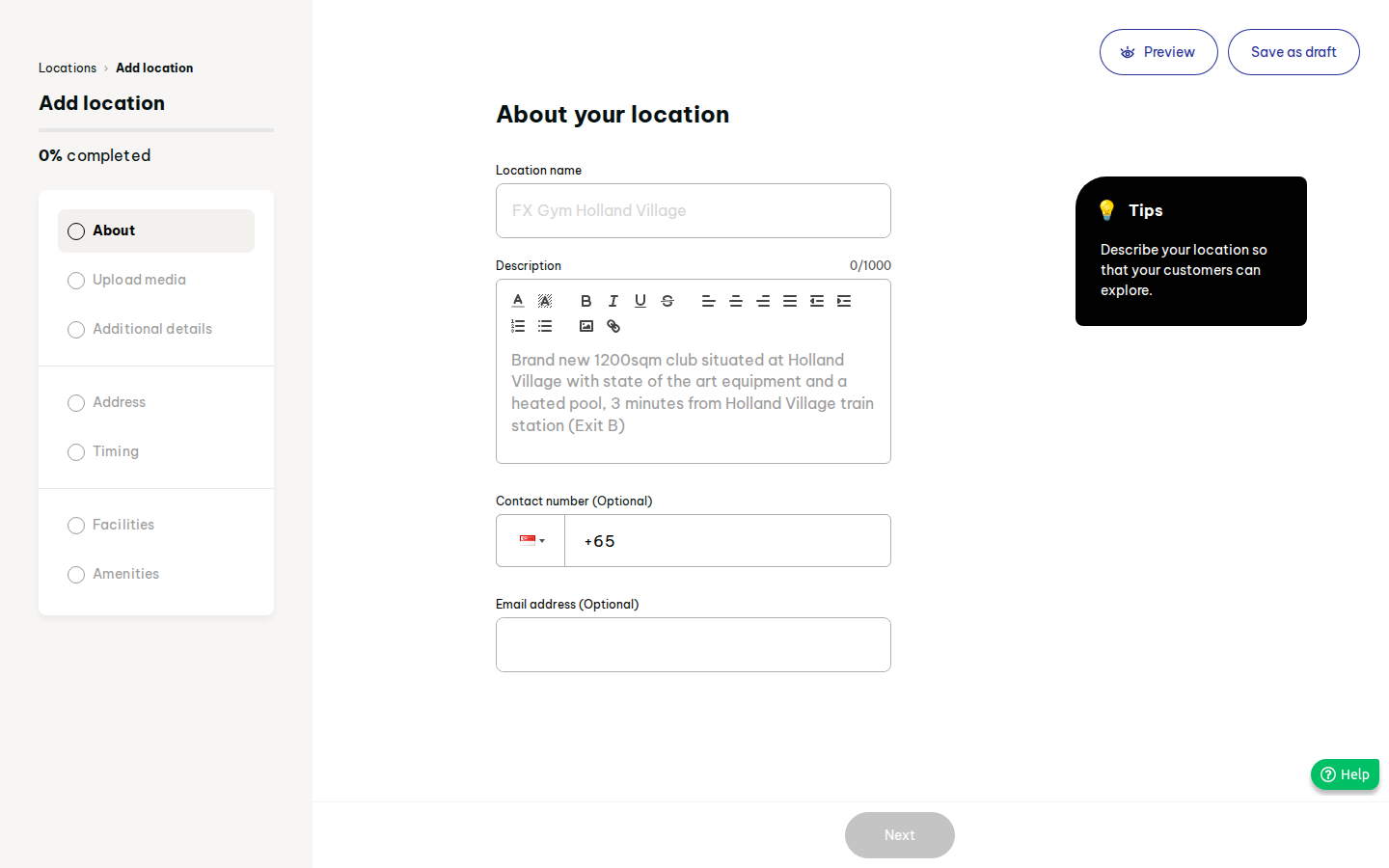
- must: Locations with draft/active status, address, weekly opening hours, rooms (facilities) with capacity.
- must: Staff list + add-staff wizard, role assignment, availability-for-booking flag, staff statuses.
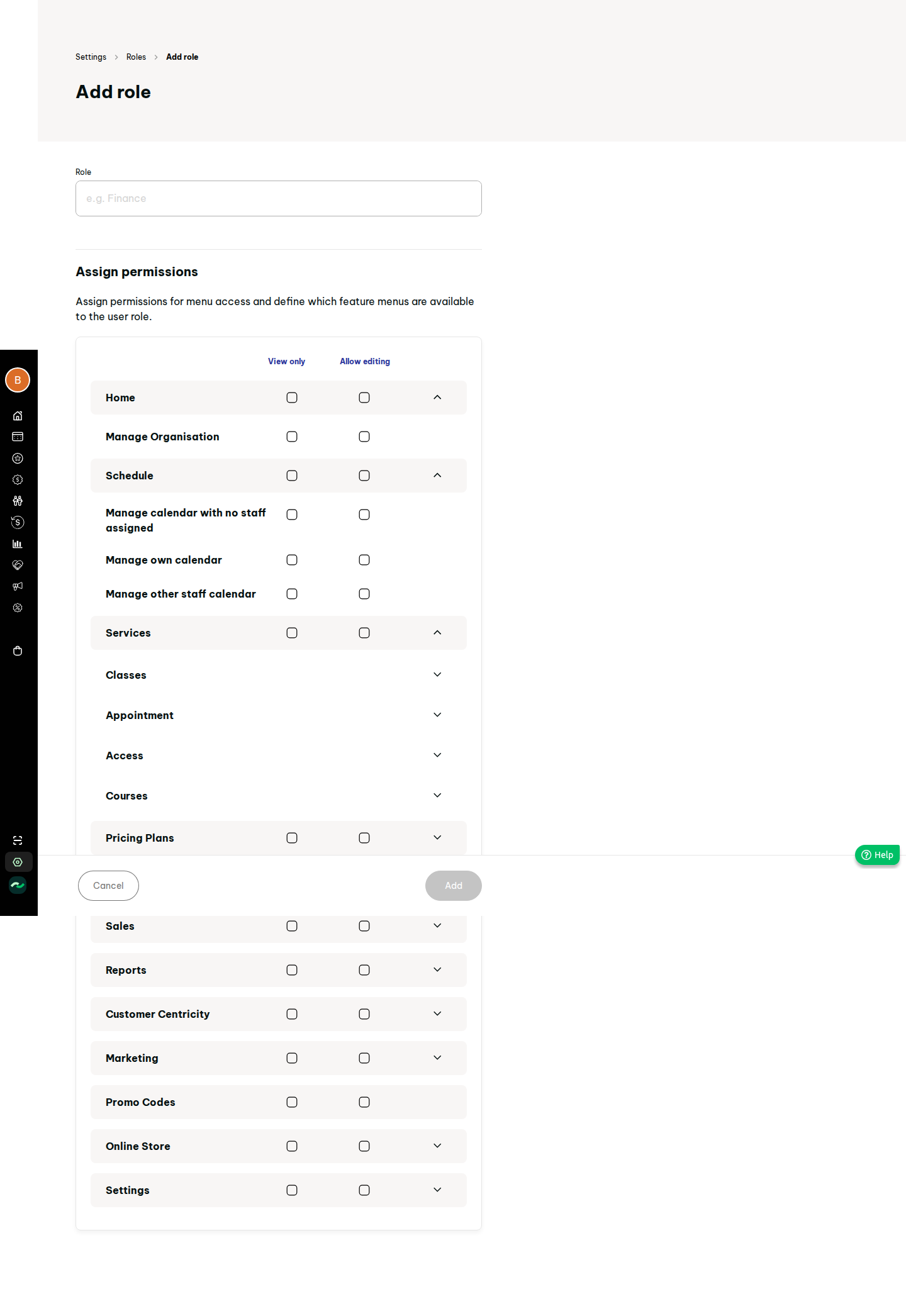
- must: Roles list and permission tree (view / edit per node), system Admin role.
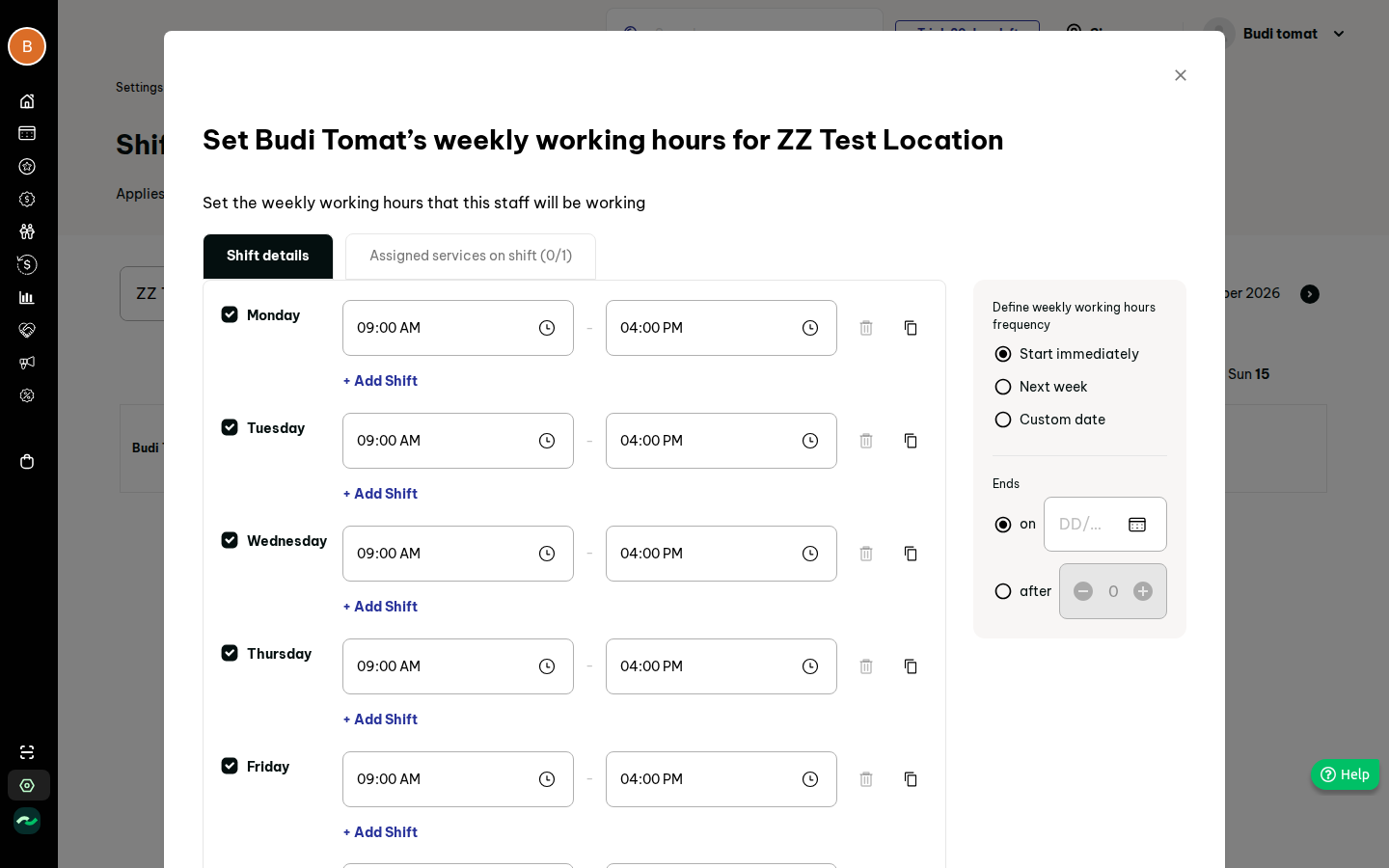
- must: Shift hours: assign staff to location, weekly shifts with start/end and assigned appointment services.
- must: Admin shell: collapsible sidebar, top bar, profile menu, dashboard with Upcoming today.
- should: Opening-hours exceptions: holidays (closed or special hours) per location.
- should: Taxes (one per country, tax-inclusive pricing flag).
- should: Equipment (name, location, quantity) and resource availability (weekly, facility/equipment).
- should: Onboarding checklist with auto-complete and dismiss; dashboard quick links; trial days-left badge.
- should: Single-day shift edit/delete, delete-all-shifts, shift end rules.
-
could: Floating WhatsApp button option, announcement banner, "what's new"/support cards, global search, staff public-profile fields (skills, hobbies, bio), location amenities/transport/video. Later (v2+)
-
Custom roles gated by plan (pricing tier: TBD); extra-staff gating (pricing tier: TBD).
-
Staff detail tabs (class, ratings, notes, assigned appointments) depend on their owning modules. Out
-
Organisation / multi-business linking (beta in recon; not observed beyond a landing page).
- Billing, monthly statements, cancel-plan flow (separate PRD, plan model undecided).
- Vendor live-chat bubble (use own support link).
5. User stories
- US-01-01 As an owner, I want to enter my business details and currency/timezone, so that prices and times are correct everywhere.
- US-01-02 As an owner, I want to add a location with opening hours and rooms, so that classes and appointments have a place.
- US-01-03 As an owner, I want to mark holidays or special hours per location, so that customers know when I am closed.
- US-01-04 As an owner, I want to define a tax, so that prices can include or add tax.
- US-01-05 As an owner, I want to invite staff by email with a role, so that they log in with their own account.
- US-01-06 As an owner, I want to build custom roles by ticking permissions, so that front desk cannot see finances.
- US-01-07 As a manager, I want to set each instructor's weekly shifts and the services they work, so that only available staff can be booked.
- US-01-08 As a manager, I want to set when each room and equipment item is available, so that appointments do not double-book.
- US-01-09 As a new owner, I want a checklist on the dashboard, so that I know what to set up next.
- US-01-10 As front desk, I want today's upcoming bookings on the dashboard, so that I see who is arriving.
6. Functional requirements
| ID | requirement | priority | evidence |
|---|---|---|---|
| FR-01-01 | Business profile: logo, name, unique store slug, registered name, reg no, industry, contact email/phone/WhatsApp, address, currency, timezone; read-only business ID | must | S121 |
| FR-01-02 | Currency and timezone are required; changing currency after sales exist is blocked or warned | must | S121 (rule is our addition) |
| FR-01-03 | Settings hub listing every settings page grouped; one click per page; breadcrumb on sub-pages | must | S120, F50 |
| FR-01-04 | Location CRUD with status draft/active; wizard steps About, Media, Details, Address, Timing, Rooms, Amenities; Save as draft at any step; Next disabled until step valid | must | S122, S122b, F52 |
| FR-01-05 | Location required fields: name, description, one image (2:1 crop), validity (lease) from/to, address line1/city/zip; slug auto from name | must | F52 |
| FR-01-06 | Weekly opening hours per location (7 days, closed flag, default Mon-Sun 08:00-17:00, apply-to-all) | must | S122b step 5 |
| FR-01-07 | Rooms (facilities) per location, optionally grouped by level: name, capacity, description, internal note, image, status | must | S122, S08j |
| FR-01-08 | Amenities list, transport directions, optional video on a location | could | S122 |
| FR-01-09 | Holidays: description, one or more locations, optional "include online classes", closed all day or special hours, single date or range, notify-customers flag (default on) | should | S130, S130b, F55 |
| FR-01-10 | Holidays never cancel existing bookings; banner states this; bookings during a holiday are still listed | should | S130 |
| FR-01-11 | Tax: one tax per country; name, percentage, optional registration number; edit/remove with confirm; flag "prices include tax" | should | S123, S123b, F51 |
| FR-01-12 | Equipment: name, optional display name, location, quantity, assigned services | should | S124, S124b |
| FR-01-13 | Resource availability: per location, tabs facility/equipment, weekly grid, assign resources then set availability per day | should | S131, S131b |
| FR-01-14 | Staff list with filters location/role/availability, status tabs (staff, invited, locked, deactivated, draft), columns name, role, last login, invited by, availability | must | S140 |
| FR-01-15 | Add-staff wizard: account (name, email, role, available-for-booking), contact (mobile), personal (gender), employment (title, start date, type, default location), website display (on/off, photo, skills, bio); progress indicator; save as draft | must | S144, F53 |
| FR-01-16 | Staff email is login identity; invitation email via existing email-OTP flow; staff signs in with OTP or Google | must | S144; existing auth |
| FR-01-17 | Staff statuses: draft, invited, active, locked, deactivated; deactivation keeps history and removes login | must | S140 |
| FR-01-18 | Staff detail page: account, basic, personal, employment, display-on-website, emergency contact; tabs for classes/ratings/notes/appointments filled by other modules | should | S146 |
| FR-01-19 | Roles list (name, type system/custom, created by/on, user count); system Admin undeletable | must | S141, S145 |
| FR-01-20 | Role editor: name + permission tree, each node with View and Edit; ticking Edit on parent ticks view+edit on children; unticking edit keeps view; edit implies view | must | S143, S143c, F54 |
| FR-01-21 | Permission tree mirrors sidebar and settings pages one-for-one (see section 11); new modules register their nodes | must | recon permission matrix |
| FR-01-22 | Roles in use cannot be deleted until users are reassigned | must | our addition |
| FR-01-23 | Custom-role creation and extra staff may be plan-gated; failure shows a clear banner (pricing tier: TBD) | could | F53, F54 |
| FR-01-24 | Shift hours: pick location, assign staff to location, weekly grid Mon-Sun per staff | must | S142, S195-S197 |
| FR-01-25 | Weekly shift editor: per-day on/off, multiple shifts per day, copy-to-days, assigned appointment services per shift, start immediately/next week/custom date, end on date or after N weeks | must | S198, S198b-d, F71 |
| FR-01-26 | Single-day shift edit/delete from grid cell; delete-all-shifts for a staff member | should | S199, S199b-c |
| FR-01-27 | Staff selectable for an appointment only if they have a shift covering the slot and the service | must | 08 gapfill note |
| FR-01-28 | Sidebar: collapsed icon rail, hover/pin expands with labels and business name; items filtered by the user's view permissions | must | S05_sidebar, S01 |
| FR-01-29 | Top bar: search (could), trial days-left badge, profile menu with greeting, profile (existing), logout | should | S04 |
| FR-01-30 | Dashboard: greeting, Upcoming today (filter all/class/appointment; lists bookings), quick links | must | S01 |
| FR-01-31 | Onboarding checklist tiles: create location, set staff, create pricing plan, create class, create schedule, set up payment; each 1 click to target; tile auto-hides when data condition met; collapse and dismiss; card hidden when all done | should | S01, S01c, F01 |
| FR-01-32 | Dashboard announcement banner and what's-new / support cards, content from config | could | S01 |
| FR-01-33 | Floating WhatsApp button toggle for storefront | could | S121 |
| FR-01-34 | All settings forms: Save disabled until dirty and valid; success toast; unsaved-changes guard | should | recon pattern |
7. Screens
Modelled on original S-IDs; each has loading (skeleton), empty, filled, error states.
- Shell: sidebar, top bar, profile menu (S01, S04, S05_sidebar).
- Dashboard (S01): empty = "no bookings yet"; checklist visible/collapsed/dismissed/complete.
- Settings hub (S120).
- Business info (S121).
- Locations list + wizard (S122, S122b); empty state with add button.
- Taxes list + drawer (S123, S123b); Equipment list + drawer (S124); Holidays list + drawer (S130); Resource availability (S131).
- Staff list, wizard, detail (S140, S144, S146).
- Roles list, editor (S141, S143, S145).
- Shift hours grid, assign-staff drawer, weekly shift modal, day modal (S142, S195-S199).
Our shell uses existing
web/layout patterns; followprofileform pattern for forms.
8. Flows
Flow A, first run (target: 10 clicks plus typing to be bookable): Dashboard tile "create location" -> wizard -> publish -> tile "set staff" -> add staff -> assign to location -> set weekly shift. Flow B, add tax: Settings > Taxes > Add > name + % > Save (original ~5 clicks; target equal). Flow C, add role: Roles > Add > name > tick > Add (target 5 clicks + ticks). Flow D, shift: Shift hours > pick location > Assign staff > tick > Assign > pencil > Set weekly shift > Apply (original ~8; target 7 by defaulting end rule to "no end"). Edge cases: no location yet (dependent selects show hint with link instead of an empty dropdown, fixing a dead end seen in the original); duplicate slug; duplicate tax country; deleting a location with future sessions blocked; last owner cannot be removed; staff email already exists.
9. Data model
- Business: id, short_code, name, slug (unique), logo, legal_name, reg_no, industry, email, phone, whatsapp, floating_whatsapp, address, country, currency, timezone, plan, trial_end (plan fields guess).
- Location: id, business_id, name, slug, description, contact, images, status (draft/active), valid_from, valid_to, address fields + geo, amenities[], transport[].
- OpeningHours: location_id, weekday, open, close, closed.
- Room: location_id, level, name, capacity, description, note, image, status.
- Equipment: location_id, name, display_name, quantity, service_ids.
- ResourceAvailability: resource_type, resource_id, location_id, weekday/date, start, end.
- Holiday: id, description, location_ids[], include_online, closed|special hours, date_from, date_to, start/end time, notify.
- Tax: country, name, percent, registration_no; business.prices_include_tax.
- User (existing): extend with staff profile (title, gender, employment fields, bio, show_on_site, available_for_booking, status).
- StaffLocation: staff_id, location_id (default flag).
- Role: id, name, type, permissions (map node_key -> none/view/edit).
- Shift: staff_id, location_id, weekday or date, start, end, service_ids[], effective_from, ends_on or ends_after_weeks.
- OnboardingState: dismissed flag per user/business; tile completion derived, not stored. Guess: permissions stored as JSON map; node keys are strings registered in code.
10. Business rules & edge cases
- Timezone is per business; all times stored UTC, shown in business timezone.
- A location must be active with at least one room before a class session can be scheduled there.
- Edit permission requires view; server rejects edit without view.
- Holidays override opening hours for the dates; special hours replace them.
- A shift cannot overlap another shift of the same staff on the same day.
- Staff assigned to no location cannot be given shifts.
- Deactivated staff stay on historic bookings; future-session reassignment is flagged on deactivate.
- Pages need skeletons: original hydrates slowly (3-8 s); target < 1 s p75 for settings pages.
11. Permissions
Nodes (each View / Edit), derived from recon matrix: Home; Schedule (no-staff, own, other calendars); Services (Classes, Appointment, Access, Courses each with bookings/definition/settings, plus "override restricted plan"); Pricing plans; Customers (+details, wallet, referrals, groups, tags); Sales (view/create/edit/refund/void etc.); Reports; Customer centricity; Marketing; Promo codes; Online store; Settings (each settings page, including Users, Roles, Shift hours). Owner and Admin: all. Default custom roles: none shipped in v1 (open question). Only users with Settings > Roles Edit can change roles; no one can edit their own role.
12. Acceptance criteria
- AC-01: Given no location, when the owner opens the dashboard, then the checklist shows a create-location tile; after the location is saved as active, the tile disappears without reload.
- AC-02: Given a role with Customers View only, when that user calls a customer write endpoint, then the API returns 403.
- AC-03: Given a role editor, when I tick Edit on a parent, then all children show View and Edit ticked; when I untick Edit, View remains.
- AC-04: Given a holiday for location L on date D with notify on, when saved, then existing bookings on D remain and affected customers are queued for email.
- AC-05: Given a tax for the business country, when I add a second for the same country, then I get a validation error.
- AC-06: Given staff with a Mon 09:00-16:00 shift for service X, when booking X on Mon 17:00, then that staff is not offered.
- AC-07: Given an invalid wizard step, then Next is disabled and the missing field is named.
- AC-08: Given a user without Settings > Roles view, then Roles is hidden from the settings hub and the route returns 403.
13. Dependencies & open questions
Depends on: existing auth/profile. Consumed by: every other PRD (location, room, staff, roles). Open:
- Plan gating of custom roles/extra staff/locations (not decided; pricing tier: TBD).
- Global search behaviour was disabled in the recon; not observed.
- Result of Save on business info/checkout not exercised in recon; validation rules (slug format, reserved words) are our guess.
- Staff status "Invited/Locked" transitions not observed; lock rule is a guess.
- Original tile 6 on the checklist was hidden/conditional; unknown.
- Should resource availability and shifts be appointment-only, as in the original, or also constrain classes?
- Default custom roles to ship.
14. Evidence
See evidence/evidence.md.