PRD 03 — Schedule & Calendar
Status: draft · Priority tier: P0 · Size: L · Depends on: PRD 02 Classes, Locations & Facilities (incl. staff shifts), Customers, PRD 04 Appointments (calendar booking)
1. Summary
The staff-facing calendar where class sessions, appointments and time blocks are created, published and managed: Week, Day-by-staff and Day-by-facility views, a session create/edit drawer with repeat rules, staff/facility/capacity assignment, publish/unpublish, duplicate, cancel/delete, and bulk tools. Published sessions are what customers see and book on the storefront.
2. Problem & goals
Studios live in this screen daily. Goals:
- Create a repeating class series in <= 7 clicks plus typing (original ~7).
- Any session action (edit, duplicate, cancel, add booking) reachable from the event popover in <= 2 clicks.
- No destructive bulk action without a review step.
- Staff/facility double-booking is surfaced before save (original behaviour unobserved). Non-goals: ClassPass flag; month grid view; appointment service authoring (PRD 04); payment flows.
3. Users & roles
Owner/manager (all), front desk (view, add bookings, cancel sessions per permission), instructor (view own), customer (sees only published sessions on storefront).
4. Scope
In (v1)
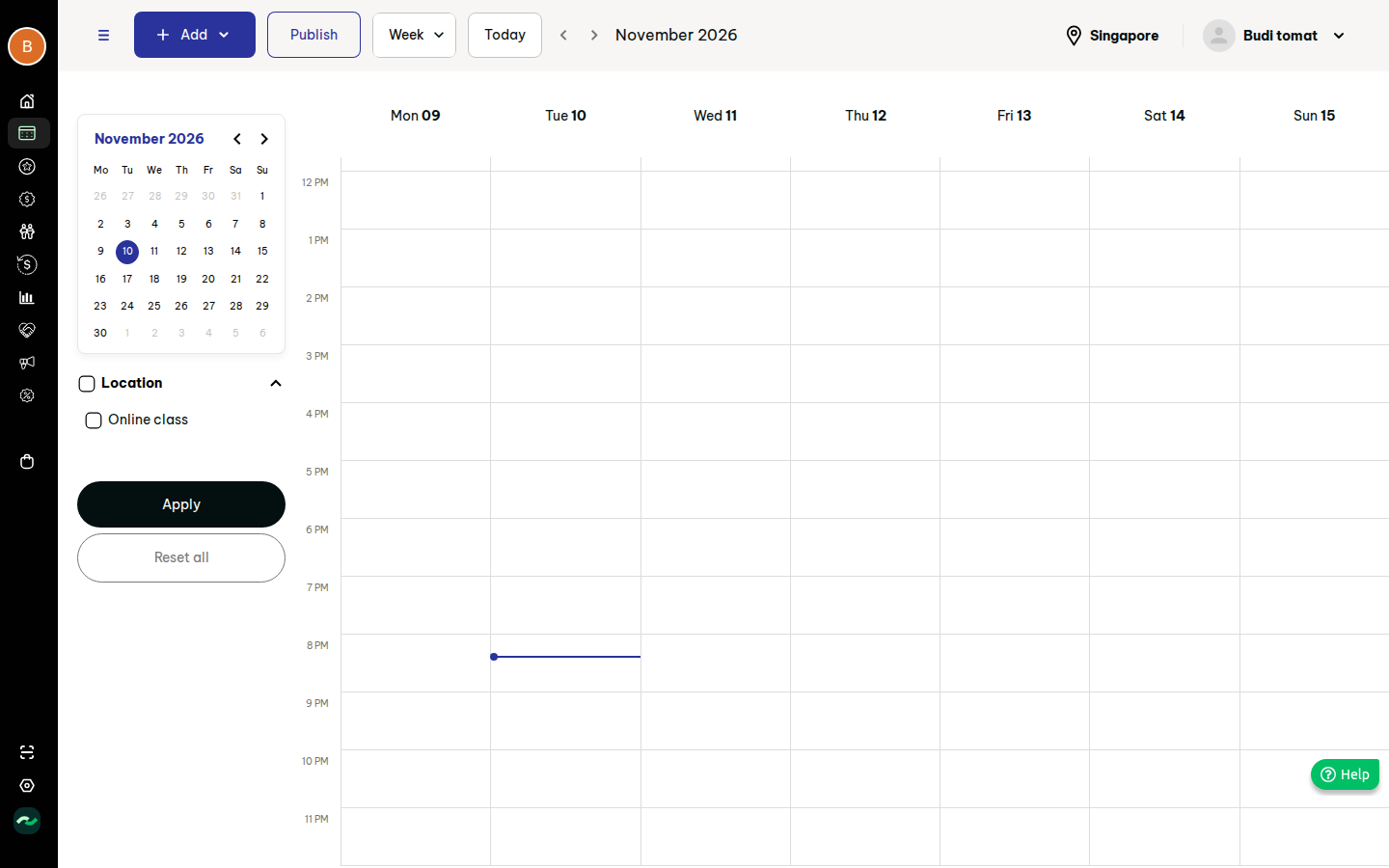
- must: Week, Day-by-staff, Day-by-facility views; mini-calendar, Today, prev/next; filters (location, class, appointment) with Apply/Reset.
- must: create session (no repeat / daily / weekly; end by date or after N occurrences), edit, duplicate, cancel/delete with notify option.
- must: staff (optional, multi) and facility assignment; capacity auto-filled from facility, editable.
- must: publish now/later per session; "Publish all" bulk; storefront shows only published, upcoming sessions.
- must: event card + popover; add booking to session; appointment booking from calendar (see PRD 04).
- should: time blocks; session advanced overrides (min-pax auto cancel, booking window, check-in window, late cancel); private session; custom display name; duplicate schedule; bulk delete schedule; copy public link; "slots within a day" recurring option.
- could: import schedule from template + download template. Later: month view; drag-to-move/resize events; conflict detection beyond warning; waitlist. Out: ClassPass sync (third-party, skip).
5. User stories
- US-03-01 As a manager, I want to see the week by time grid so that I understand studio load.
- US-03-02 As a manager, I want day columns per staff or per room so that I can spot gaps and clashes.
- US-03-03 As a manager, I want to create a weekly class series with an end date so that I do not add each session by hand.
- US-03-04 As a manager, I want to keep sessions unpublished until ready so that customers do not see drafts.
- US-03-05 As a front desk user, I want to add a customer to a session from its popover so that walk-up bookings are fast.
- US-03-06 As a manager, I want to cancel a session and notify booked customers and staff so that no one turns up.
- US-03-07 As a manager, I want to copy a whole week to future weeks so that I reuse my timetable.
- US-03-08 As a manager, I want to block staff/room time so that customers cannot book it.
- US-03-09 As a manager, I want to bulk-delete a range with a review step so that I cannot wipe the schedule by mistake.
6. Functional requirements
| ID | requirement | priority | evidence |
|---|---|---|---|
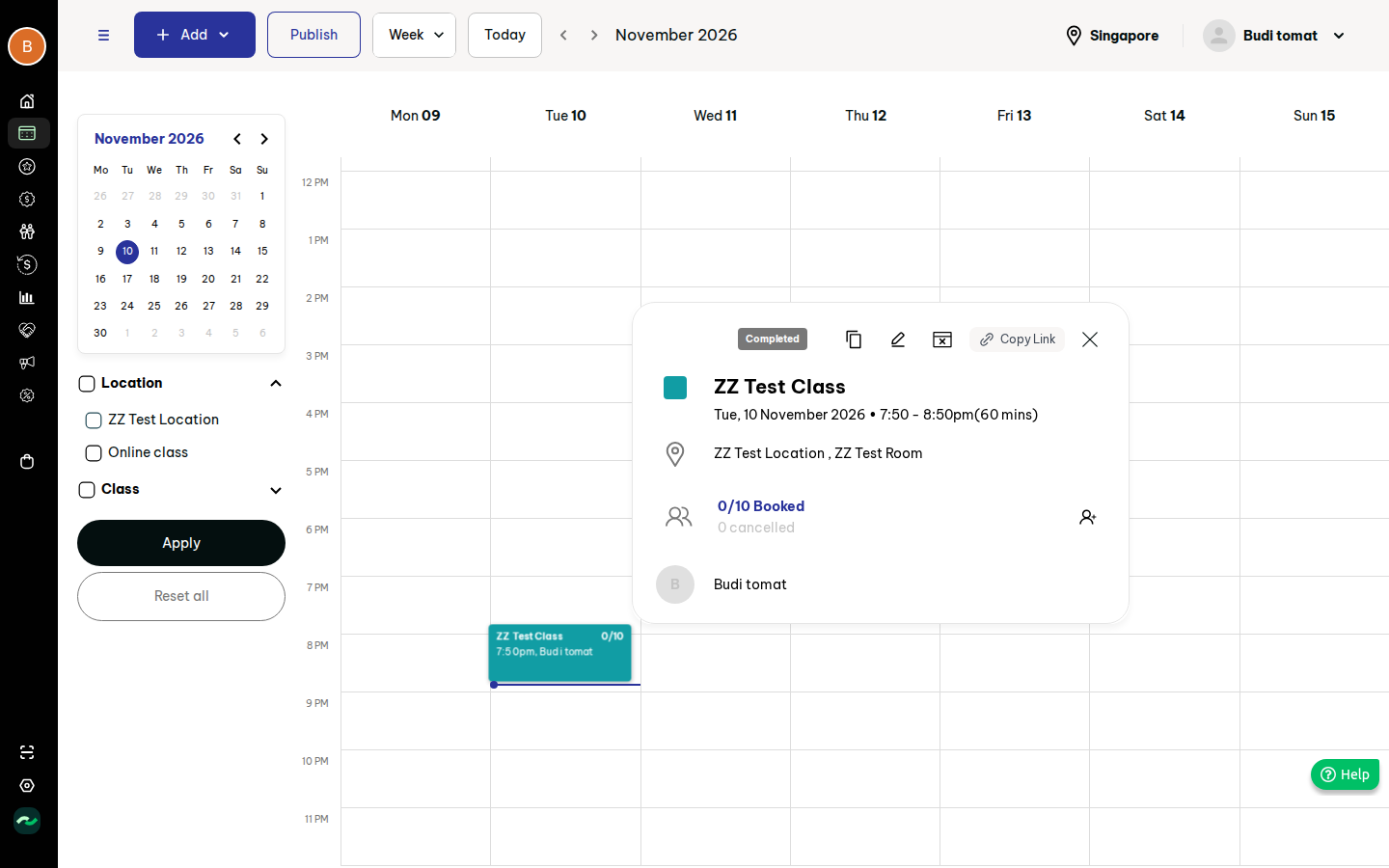
| FR-03-01 | Week view Mon-Sun, 24h grid, "now" line, scrolls to ~noon on load; event card shows class name, booked/capacity, time, staff, in the session's colour. | must | S05, S10 |
| FR-03-02 | Day-by-staff and Day-by-facility views: one column per staff / facility with counters (classes, appointments). | must | S14 |
| FR-03-03 | Navigation: view switch, Today, prev/next by week/day, mini month calendar with its own month paging, collapsible filter panel. | must | S05 |
| FR-03-04 | Filters: Location (incl. online), Class, Appointment groups with select-all; applied only on Apply; Reset all. | must | S15 |
| FR-03-05 | "Add" menu: Class, Appointment, Recurring appointment, Time block; bulk: Import, Download template, Duplicate schedule, Delete schedule. | must | S06 |
| FR-03-06 | Create-session drawer: class (search; drafts excluded), optional display-name override, start date, start time (default now), read-only duration from class, colour (default), repeat, location, facility, staff, capacity, publish option, flags. | must | S08 |
| FR-03-07 | Save disabled until class, location and facility set; location lists only locations with facilities; empty dropdown shows an explanatory hint (improvement over original dead end). | must | S08, F03 |
| FR-03-08 | Repeat: none, daily, weekly (weekday chips, default start weekday); end on date or after N occurrences; optional "slots within a day" generation. | must | S08g, F04 |
| FR-03-09 | Capacity auto-fills from facility capacity; editable; cannot be below current booked count on edit. | must | S08, S10 |
| FR-03-10 | Staff multi-select (optional); show staff who are available per shift (assumption: warn, not block). | should | S08n, S198 |
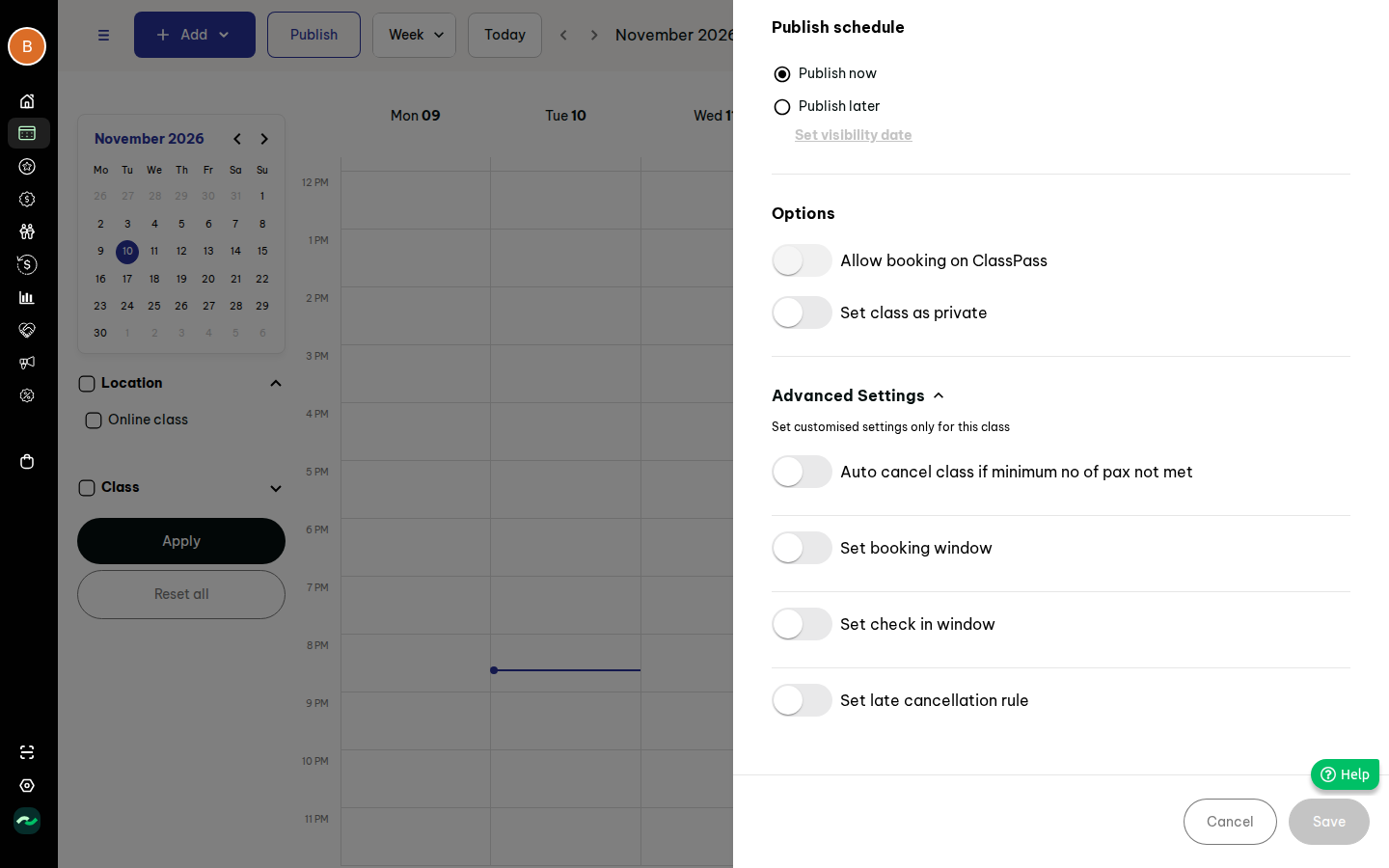
| FR-03-11 | Publish: now or later with visibility date/time; unpublish returns to hidden without cancelling bookings. | must | S08m, S07 |
| FR-03-12 | Publish-all dialog: publish all unpublished sessions now or later; confirm. | should | S07 |
| FR-03-13 | Advanced per-session overrides (collapsed): auto-cancel if min pax not met (N pax, X hours/days before), booking window, check-in window, late-cancel hours. Defaults come from class settings (PRD 02). | should | S08k, S08l |
| FR-03-14 | Private session (hidden from public listing, reachable by link/admin booking). | should | S08 |
| FR-03-15 | Event popover: status pill (Upcoming/Completed/Cancelled), duplicate, edit, cancel/delete, copy public link, close; title+colour, date/time/duration, location+facility, "N/M booked" link, cancelled count, add-booking icon, staff. | must | S11, S209f |
| FR-03-16 | Editing a recurring session asks scope: this session only / this and following (assumption; original scope choice not observed). | must | S11c |
| FR-03-17 | Cancel/Delete dialog: choose Cancel (keeps record, bookings cancelled) or Delete (unrecoverable); checkbox notify customers and staff; confirm. Cancel triggers credit return per PRD 02 refund rules. | must | S11b, F06 |
| FR-03-18 | Add booking from popover: customer search (name/mobile/email), owner + attendees (pax), internal note, notify staff; allowed on past sessions for admins. Class capacity enforced for storefront, admin may override with warning (assumption). | must | S12, S209g, S209h |
| FR-03-19 | Duplicate schedule: tabs Just once / Auto repeat; source range (<= 31 days), location, target start date, include cancelled, visibility now/later; Review step then confirm. | should | S13, F07 |
| FR-03-20 | Delete schedule: a day / range / from date onwards, optional filters (class, staff, location); Review step shows count; confirm. | should | S13, F07 |
| FR-03-21 | Time block: title (optional), date, all-day, start/end (default now..+1h), repeat, description, blocked staff/facility/equipment (>= 1 required). Blocked resources become unbookable for appointments and for new class sessions (warn). | should | S13 |
| FR-03-22 | Recurring appointment booking: customer, location, select multiple dates/slots on a month calendar, review payment, add. Details in PRD 04. | should | S13 |
| FR-03-23 | Import schedule: download template, upload filled file, validation report with row errors before commit. | could | S13 |
| FR-03-24 | Public visibility: a session appears on the storefront timetable/class pages only when published, not private, not past and its class is active and listed. Storefront shows slots-left per PRD 02 setting. Part 10 (storefront checkout) was not available when this PRD was written; checkout interaction is an open question. | must | S209zi, S209zj, part 07 |
| FR-03-25 | Appointments and time blocks render on the same calendar with distinct styling and the booking drawer (PRD 04). | must | S209u, S209v |
| FR-03-26 | Calendar timezone = business timezone; show label. | must | S07 |
7. Screens
| Our screen | Modelled on | States |
|---|---|---|
| Calendar (week/day) + filter panel | S05, S14, S15 | loading skeleton, empty week, filled, filter applied, error/retry |
| Add/Edit session drawer | S08 | empty (Save disabled), partial, valid, publish-later, advanced open, server error |
| Event popover | S11 | upcoming, completed, cancelled |
| Cancel/Delete dialog | S11b | default, confirm loading |
| Add booking panel | S12, S209g/h | search empty, results, customer chosen |
| Duplicate / Delete / Publish / Import dialogs | S13, S07 | form, review, success, error |
| Time block drawer | S13 | empty, valid |
8. Flows
- Create series: Add > Class (2) > pick class > weekly chips > end after N > location > facility (auto capacity) > Save. Edges: no facility = hint with link to create one; end required for repeating; max occurrences cap* (guess 200).
- Add booking: click event > add-person icon > search > pick > Add booking (4 clicks + search).
- Cancel session: popover > cancel icon > select Cancel > notify > Confirm.
- Duplicate week: Add > Duplicate schedule > range > target > Review > Confirm.
9. Data model (guesses marked *)
- ClassSession(id, class_id, series_id, display_name, starts_at, duration_min, colour, repeat_type none|daily|weekly, weekdays[], slots_in_day, end_date|end_count, location_id, facility_id, staff_ids[], capacity, publish_state draft|published|scheduled, publish_at, is_private, status upcoming|completed|cancelled, overrides{min_pax,min_pax_lead, book_earliest, book_latest, checkin_earliest, late_cancel_hours})
- TimeBlock(id, title, date, all_day, start, end, repeat, description, staff_ids[], facility_ids[], equipment_ids[])
- ClassBooking: see PRD 02. AppointmentBooking: see PRD 04. Relation: occurrences are materialised rows linked by series_id*.
10. Business rules & edge cases
- Duration is read-only; changing class duration does not alter existing sessions*.
- Facility cannot host two overlapping sessions/appointments (warn; hard block TBD).
- Cancelled sessions keep their roster as history; cancel does not remove bookings silently — customers notified only if box ticked.
- Min-pax auto-cancel runs a scheduler at (start - lead) and cancels + notifies if booked < min.
- Daily/weekly series respect location holidays (original not observed — open question).
- Past sessions are viewable/bookable by admins only.
- Bulk operations are atomic with a review count; failures reported per row.
- Unpublishing never removes existing bookings.
11. Permissions
| Action | Owner | Manager | Front desk | Instructor |
|---|---|---|---|---|
| View calendar | yes | yes | yes | own* |
| Create/edit/duplicate session | yes | yes | no* | no |
| Cancel/delete session | yes | yes | cancel* | no |
| Add booking | yes | yes | yes | no* |
| Bulk delete/duplicate/publish-all | yes | yes | no | no |
- = assumption pending Roles PRD.
12. Acceptance criteria
- Given a class, location with a facility of capacity 10, when I create a session, then capacity pre-fills 10 and Save is enabled.
- Given weekly repeat Mon+Wed ending after 6 occurrences, when saved, then exactly 6 sessions exist, alternating Mon/Wed from the start date.
- Given a draft class, when I search in the session drawer, then it is not listed.
- Given a session scheduled to publish tomorrow, then the storefront does not list it today and lists it after the publish time.
- Given a session with 3 bookings, when I choose Cancel with notify ticked, then bookings are cancelled, 3 customers and staff are notified, and the session shows Cancelled.
- Given Delete schedule for a range, when I press Review, then I see the count; nothing is deleted until Confirm.
- Given a time block on Room A 10-11, then appointments needing Room A cannot be booked in that window.
- Given the popover on a past session, when an admin adds a booking, then it is stored as Completed.
- Given filters changed but not applied, then the grid is unchanged.
13. Dependencies & open questions
Depends: PRD 02, 04, Locations/Facilities, Customers, Notifications. Open questions
- Edit/cancel scope on recurring series (this vs all) — not observed.
- Conflict handling for staff/facility overlaps — not observed.
- Does Cancel return credits automatically? Which refund path? Not observed.
- Holidays/closed days interplay with series — not observed.
- Max series length, max sessions per day — not observed.
- Storefront session booking and checkout: part 10 not present; part 07 shows empty timetable only ("No Schedule Available"); logged-in booking flow unobserved.
- "Slots with duration" semantics are only partially known.
- Import template columns not observed.
14. Evidence
See evidence/evidence.md.